In the ever-evolving world of music streaming, audio quality remains a top priority for listeners who crave immersive experiences. Amazon Music has grown into a powerhouse platform, boasting over 100 million songs, personalized playlists, and advanced features like spatial audio in Dolby Atmos and 360 Reality Audio. But for audiophiles and everyday users alike, the quest for high-bitrate downloads often leads to one key format: MP3 at 320kbps. This bitrate strikes an ideal balance between file size and sound fidelity, delivering near-CD quality with rich details, dynamic range, and minimal compression artifacts—perfect for offline playback on any device.
However, Amazon Music doesn't offer direct MP3 downloads due to its focus on proprietary streaming formats and digital rights management (DRM) protections. Downloads through the app are encrypted and tied to your account, limiting flexibility for transfers to MP3 players, car stereos, or other non-Amazon ecosystems. This creates frustration for users wanting true ownership and portability of their music library.
That's where this comprehensive guide comes in. We'll explore why 320kbps matters, compare Amazon's audio options, and provide a step-by-step solution for achieving Amazon Music download MP3 320kbps using reliable tools. Whether you're an Unlimited subscriber seeking offline freedom or a Prime member upgrading your setup, this 2026 update covers legal considerations, troubleshooting, and best practices to elevate your listening. By the end, you'll have the knowledge to build a high-quality, DRM-free collection without compromising on sound.
- Does Amazon Music Support 320kbps MP3?
- Why Users Want Amazon Music Download MP3 320kbps
- Amazon Music Bitrate Comparison (Detailed Table)
- Can You Download Amazon Music as 320kbps MP3 Directly?
- Best Way to Download Amazon Music MP3 320kbps (Step-by-Step)
- 320kbps vs 256kbps – Is It Worth It?
- Best Audio Settings for 320kbps MP3
- Is Downloading Amazon Music 320kbps MP3 Legal?
- Common Problems & Solutions
- FAQs about Amazon Music Download MP3 320kbps
Does Amazon Music Support 320kbps MP3?
Amazon Music offers a tiered approach to audio quality, but direct support for 320kbps MP3 isn't built-in. Let's break it down clearly.
Amazon Music includes several subscription levels: Free (ad-supported, standard quality),Prime (included with Amazon Prime, ad-free standard quality), and Unlimited (premium access with enhanced audio). As of 2026, Amazon Music Unlimited integrates high-definition (HD) and Ultra HD streaming by default, without extra fees for most plans.
HD delivers lossless 16-bit audio at 44.1 kHz with an average bitrate of 850kbps, while Ultra HD goes up to 24-bit/192kHz at around 3730kbps for millions of tracks.
Standard streaming, available on Free and Prime tiers, uses compressed formats like AAC at variable bitrates up to around 320kbps for efficiency. However, this isn't MP3, and downloads are DRM-protected, meaning they're playable only within the Amazon Music app. There's no official export to 320kbps MP3, as Amazon prioritizes ecosystem lock-in to prevent unauthorized sharing.
For purchased tracks from Amazon's digital store, you can download DRM-free MP3s at 256kbps, but this doesn't apply to streamed content from Unlimited or Prime. If you're asking, "Does Amazon Music support 320kbps?"—yes, in streaming bitrates for standard quality, but not as downloadable MP3 files without third-party intervention.
Why Users Want Amazon Music Download MP3 320kbps
High-bitrate MP3 downloads from Amazon Music appeal to a wide audience for several compelling reasons. First, 320kbps provides superior sound quality compared to lower bitrates, capturing more nuances in vocals, instruments, and bass—essential for genres like classical, rock, or EDM where detail shines.
Offline flexibility is another major draw. With DRM-free 320kbps MP3s, you can listen anywhere without relying on the Amazon app or internet. Transfer files to MP3 players, USB drives for car audio, or even burn CDs for legacy systems. This eliminates restrictions on device compatibility, making it ideal for workouts, travel, or areas with spotty connectivity.
Removing DRM also means true portability across ecosystems. Play your library on iPhones, Androids, Windows Media Player, or smart speakers without account verification. For audiophiles, 320kbps meets "near-lossless" standards, preserving audio fidelity close to CD quality while keeping file sizes manageable.
If you're using high-end headphones like Sony WH-1000XM5 or Bose QuietComfort, bitrate matters deeply—it unlocks the emotional depth of your favorite tracks, turning a simple listen into an immersive experience. Ultimately, users seek control over their music, free from platform limitations.
Amazon Music Bitrate Comparison (Detailed Table)
To help you understand where 320kbps MP3 fits in, here's a comparison of common formats and their attributes:
| Format | Bitrate | Quality | Device Compatibility |
|---|---|---|---|
| 128kbps MP3 | Low (128kbps) | Basic, noticeable compression | Universal (most devices) |
| 256kbps AAC | Good (up to 256kbps) | Streaming standard, decent detail | Limited to supported apps/players |
| 320kbps MP3 | Very High (320kbps) | Near CD quality, rich dynamics | Universal (MP3 players, cars, phones) |
| FLAC | Lossless (variable, avg 850-3730kbps) | Highest, uncompressed fidelity | Limited (needs FLAC-compatible hardware/software) |
This table highlights why 320kbps vs 256kbps is a popular debate—320kbps offers better clarity with broader compatibility. For the best MP3 bitrate, 320kbps is often recommended as it minimizes artifacts while staying efficient.
Can You Download Amazon Music as 320kbps MP3 Directly?
Short answer: No, there's no official option for direct 320kbps MP3 downloads from Amazon Music.
Amazon's downloads are designed for offline app playback only. For Unlimited and Prime subscribers, tracks are encrypted with DRM to protect copyrights and prevent redistribution. This means files are in proprietary formats (like .amz) and can't be exported as standard MP3s.
Purchased songs from the Amazon store come as 256kbps MP3s, but streamed content doesn't qualify.
DRM ensures music stays within Amazon's ecosystem, but it limits user freedom. To get 320kbps MP3s, you'll need third-party converters, as outlined next.
Best Way to Download Amazon Music MP3 320kbps (Step-by-Step)
While Amazon doesn't support direct exports, third-party converters like TuneBoto Amazon Music Converter provide a reliable workaround. This tool downloads and converts tracks to 320kbps MP3 while preserving HD/Ultra HD quality where possible. It's user-friendly, supports batch processing, and retains ID3 tags for organization. Focus on Amazon Music to MP3 320kbps for high-quality downloads.
Amazon Music Converter
-
Download Amazon Music songs, albums, playlists & podcasts.

-
Convert Amazon Music songs to MP3 320kbps
-
Keep ID3 tags and lyrics
-
10X download speed
-
Archive downloaded songs by album/artist/playlist
-
Burn CD and Export to iTunes/Music

Step 1 – Install Amazon Music Converter
Download TuneBoto from their official site (compatible with Windows/Mac). Install and launch it. Sign in with your Amazon Music account to access your library.
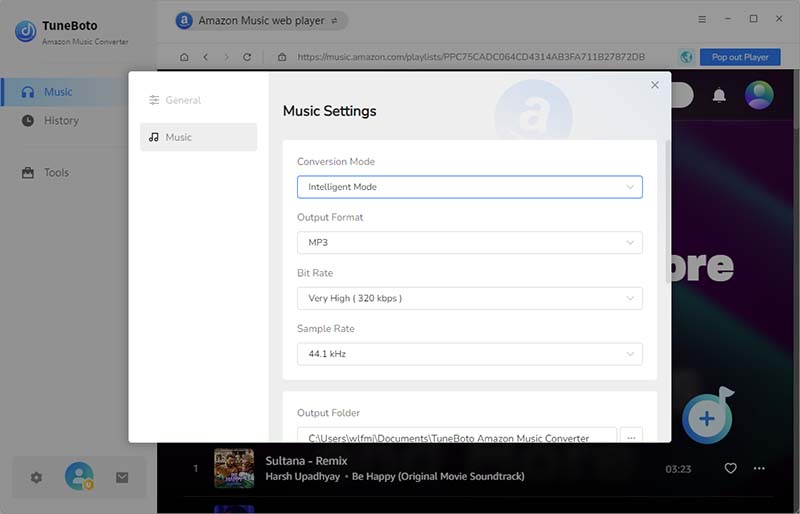
Step 2 – Select 320kbps Output
In settings, choose MP3 as the format. Set bitrate to 320kbps (CBR for consistency). Opt for 44.1kHz sample rate and stereo mode to match CD standards.
Step 3 – Add Songs
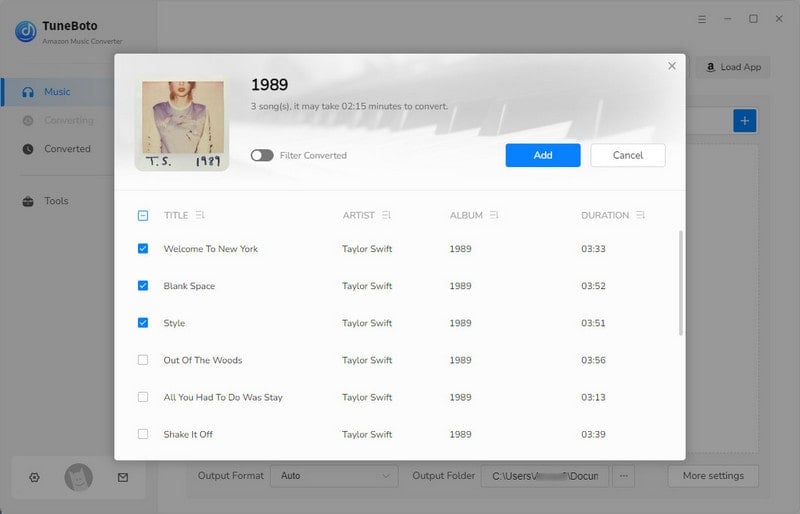
Add songs, albums, or playlists from Amazon Music.
Step 4 – Convert Songs
Hit "Convert" to start the process — TuneBoto handles decryption and conversion at up to 10x speed.
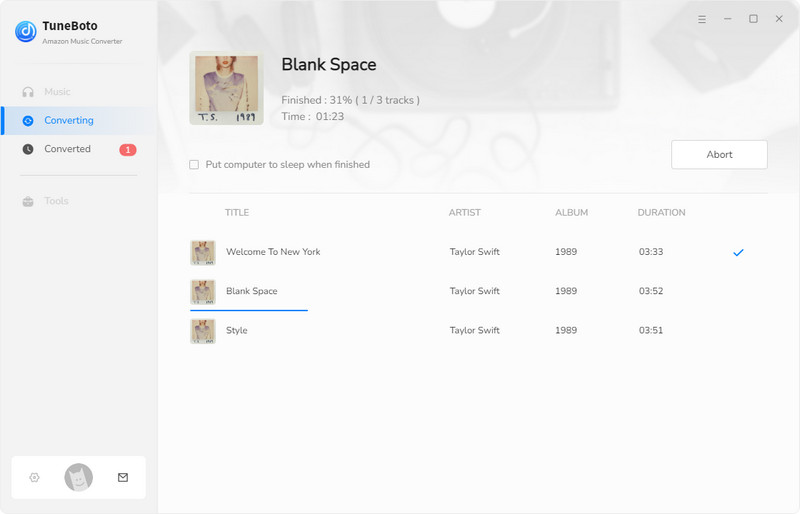
Once complete, files save to your specified folder as DRM-free 320kbps MP3s with metadata intact.
Step 5 – Transfer to Device
Copy the MP3s to your phone, MP3 player, or USB drive via file explorer. Enjoy offline on any device.
This method ensures high-quality Amazon Music downloads without quality loss.
320kbps vs 256kbps – Is It Worth It?
The jump from 256kbps to 320kbps isn't always dramatic, but it's noticeable in real-world listening. 320kbps preserves more audio data, offering better clarity, wider dynamic range, and fewer compression artifacts—especially in complex tracks with highs like cymbals or lows like bass drops. On high-end headphones, the difference shines: 320kbps feels fuller and more immersive.
However, on Bluetooth speakers or budget earbuds, you might not hear much variance. Storage-wise, 320kbps files are larger, but with modern devices, it's negligible.
File size comparison for a 3-minute song:
| Bitrate | 3-min Song Size |
|---|---|
| 128kbps | ~3MB |
| 256kbps | ~6MB |
| 320kbps | ~8MB |
If audio quality is key, 320kbps is worth it for the enhanced experience and future-proofing.
Best Audio Settings for 320kbps MP3
For optimal 320kbps MP3s, use Constant Bitrate (CBR) over Variable Bitrate (VBR) for consistent quality without fluctuations. Set sample rate to 44.1kHz—the standard for CD audio—to avoid resampling issues. Stereo mode ensures full left-right separation for immersive sound.
Retain metadata like artist, album, and artwork during conversion for easy library management. These settings maximize fidelity while keeping files compatible across devices.
Is Downloading Amazon Music 320kbps MP3 Legal?
Downloading and converting Amazon Music to 320kbps MP3 for personal use falls into a legal gray area. Under the DMCA in the US, circumventing DRM is technically prohibited, even for backups. However, if you're a paid subscriber and use conversions solely for personal, non-commercial listening—without sharing or redistributing—it's often tolerated as fair use.
Respect copyrights: Stick to your subscribed content, don't sell files, and comply with Amazon's terms. Consult local laws, as enforcement varies. This guide promotes informed, ethical use to build trust.
Common Problems & Solutions
- Bitrate not matching: Ensure converter settings are locked to 320kbps CBR; re-convert if needed.
- Playback issues: Check device compatibility—update firmware or use VLC for broad MP3 support.
- Metadata missing: Select "Keep ID3 tags" in your converter; manually edit via tools like MP3Tag if lost.
- Conversion speed slow: Close background apps or upgrade to a paid converter version for faster processing.
FAQs about Amazon Music Download MP3 320kbps
What bitrate does Amazon Music use? Standard streaming is up to 320kbps compressed, HD averages 850kbps lossless, and Ultra HD up to 3730kbps.
Is 320kbps CD quality? Yes, it's near-CD quality (close to 1411kbps uncompressed) with excellent fidelity for most listeners.
Can Android play 320kbps MP3? Absolutely—native players and apps like Poweramp handle it seamlessly.
Does 320kbps sound better on Bluetooth? Yes, especially with aptX or LDAC codecs, as higher bitrates reduce compression loss over wireless.
Conclusion
Achieving 320kbps MP3 downloads from Amazon Music unlocks superior sound quality, offline freedom, and device versatility—benefits that outweigh the platform's built-in limitations. While direct exports aren't available, tools like converters provide a straightforward path, as long as you prioritize personal use and legality.
Remember, Amazon's app excels for streaming, but for a truly flexible library, this workflow empowers you. Weigh your needs: If HD/Ultra HD matters, stick with official downloads; otherwise, embrace 320kbps for everyday excellence. Make an informed choice to enhance your music journey in 2026.
100% Safe & Secure | 30-Day Money-Back Guarantee

Ethan Cole | Senior Editor