
For video creators making Fan Cams, BookTok edits, or movie recaps on TikTok and Instagram, there is one universal headache: trying to capture scenes from Amazon Prime Video using OBS, QuickTime, or web extensions—only to end up with a pitch-black screen and audio only.
This isn't a glitch in your computer; it is a built-in copyright mechanism called DRM (Digital Rights Management) protection. To bypass this restriction and obtain pristine, watermark-free "raw footage," professional editors have abandoned traditional screen recording entirely, opting for direct-link parsing and downloading software.
To bypass Amazon's DRM black screen limits and fetch high-quality clips for edits, the absolute best tool is TuneBoto Amazon Video Downloader. Instead of recording your display, it parses video links directly in the background, downloading clean, raw 1080p HD MP4 files that can be dragged and dropped directly into CapCut, Premiere Pro, or After Effects.
Screen Recording vs. Direct Downloading for Edits
To get true raw footage, you need to stop recording and start downloading. Here is why downloading with a dedicated tool is the industry secret for editors:
| Features for Editors | Traditional Screen Recorders (OBS) | TuneBoto (Direct Downloader) |
|---|---|---|
| Black Screen Issue | ❌ High risk of black screen | ✅ 0% risk. Direct URL download |
| Video Quality | ❌ Compressed, prone to frame drops | ✅ True 1080p HD / 4K Raw Footage |
| Format Compatibility | ❌ Often MKV or proprietary formats | ✅ Universal MP4 (Ready for CapCut/AE) |
| Hardcoded Subtitles | ❌ Burned into video (Cannot remove) | ✅ Clean video (Subtitles saved separately) |
The Ultimate Tool for Raw Editing Footage - TuneBoto
Utilizing advanced background decryption technology, TuneBoto is a dedicated tool engineered to download Amazon video clips effortlessly. It runs up to 10X faster than real-time screen recording and keeps multiple audio tracks intact. Most importantly for editors, it gives you the option to download clips with no hardcoded subtitles, giving you a completely clean canvas for text effects and transitions.
Amazon Video Downloader
-
Download Prime Video anime and movies to PC/Mac as standard MP4 or MKV files.

-
Output to universal MP4/MKV format (fully compatible with AE, PR, and CapCut).
-
Preserve Dolby 5.1 surround sound and export separate SRT subtitle files.
-
Hardware acceleration enabled for lightning-fast batch downloads.
-
Free technical support and lifetime automated updates.


Step-by-Step Guide: How to Download Clips with TuneBoto
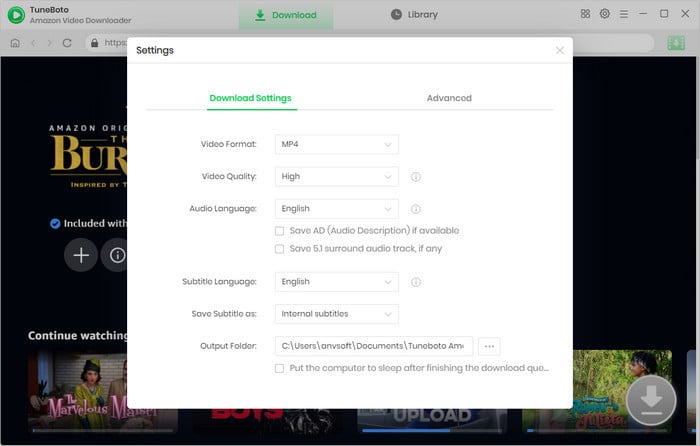
First, click the download button above to get the installer for your system. TuneBoto supports both Windows and macOS platforms. Once installed, launch the program, select your Amazon region website (e.g., amazon.com), and log into your active Prime account via the secure, built-in browser window.
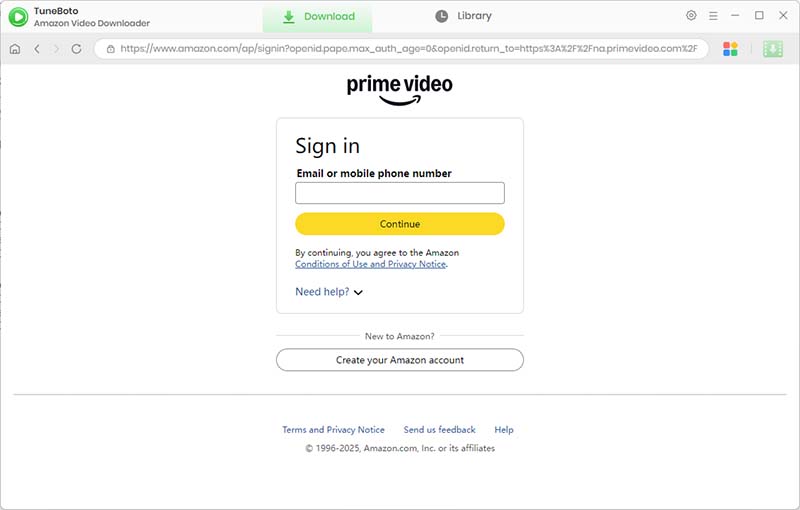
Click on the gear icon located in the upper right corner. To ensure seamless compatibility with your editing timeline, set the output format to MP4 and change video quality to High (1080p). Crucial Tip: Set the subtitle type to "None" or "External Subtitles" to get completely clean raw footage without burned-in text.
You don't need to manually copy URLs from an external browser. Simply type the name of the movie or television show you want to edit directly into TuneBoto's search bar and press Enter to pull up the official title listings.
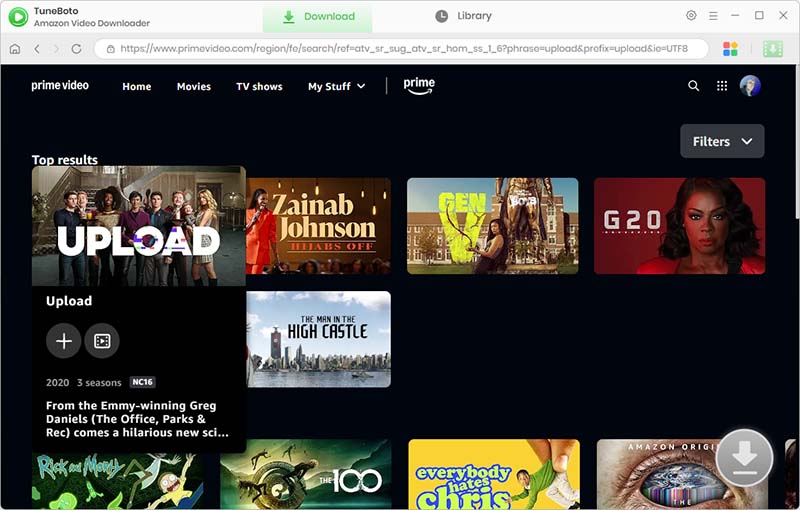
Click on the video thumbnail, and the blue download icon on the right will become active. If you are downloading a TV show, you can checkmark the exact episodes you need, and click "Advanced Download" in the bottom-left corner to double-check exact bitrates, languages, and resolutions.
Once everything is configured, click the Download button. TuneBoto's acceleration engine will finish saving the files in just a few minutes. Head over to the "Library" tab and click the folder icon next to the file. Now, you can easily drag and drop your DRM-free MP4 file directly into CapCut or After Effects and begin creating your masterpiece!
Frequently Asked Questions
Why do I get a black screen when screen recording Amazon Prime?
The black screen is a deliberate copyright protection feature called DRM. It detects capture software and blocks the video feed. A downloader bypasses this by accessing the source file instead of capturing the screen.
Can I import TuneBoto MP4 files directly into CapCut on my phone?
Absolutely. Once you download the 1080p MP4 file to your PC/Mac, you can AirDrop it to your iPhone or use Google Drive/USB to transfer it to your Android device. It will import smoothly into mobile CapCut.
Will the downloaded video have a TuneBoto watermark?
No. TuneBoto downloads completely clean, watermark-free videos, ensuring your edits remain 100% professional.
Final Word
For video editors who demand high-fidelity source files, TuneBoto Amazon Video Downloader is the definitive solution to eliminate OBS recording blocks, laggy frame drops, and awkward forced text overlays. Stop wasting hours waiting on screen recording logs and supercharge your production workflow today!