
Let’s be honest: there is nothing more frustrating than packing for a long flight, opening your laptop, and realizing your downloaded Amazon Prime movies have completely vanished.
If you rely on the official Amazon Prime Video app for offline viewing, you already know the hidden catch. Sure, it lets you download content, but those downloads are heavily encrypted, locked entirely to the app, and worst of all, they self-destruct after 48 hours of hitting play. You can’t transfer them to a USB drive, you can't play them on VLC, and you certainly can't keep them for your permanent digital archive.
Fortunately, you don't have to put up with these restrictions anymore. Whether you are looking to build a massive offline library on your PC, save a few episodes to your iPhone for a commute, or grab a quick clip using your web browser, there is a tool designed exactly for your needs.
In this comprehensive guide, we are breaking down the 9 best Amazon video downloaders in 2026, categorized by Desktop, Mobile, and Browser Extensions. Let’s find the perfect solution to keep your Prime videos forever.
Quick Comparison of the Top Downloaders
Short on time? Here is a bird's-eye view of the top tools across all three major platforms.
| Rank | Software / Tool | Platform | Best For | Output Format | Max Quality |
|---|---|---|---|---|---|
| 1 | TuneBoto Amazon Video Downloader | PC / Mac | Permanent Archiving | MP4 / MKV | 1080p HD |
| 2 | VidiCable | PC / Mac | Multi-Platform Users | MP4 / MKV | 1080p HD |
| 3 | KeepStreams for Amazon | PC / Mac | Premium Bundling | MP4 | 1080p HD |
| 4 | Official Prime Video App | iOS / Android | Casual Commuters | Encrypted | Up to 4K |
| 5 | PlayOn Cloud | iOS / Android | Cloud DVR Recording | MP4 | 720p / 1080p |
| 6 | StreamFab for Android | Android | Direct Mobile Saving | MP4 | 1080p HD |
| 7 | Video DownloadHelper | Chrome / Edge | General Web Video | MP4 | Varies |
| 8 | CocoCut | Chrome / Edge | HLS/M3U8 Streams | MP4 | Varies |
| 9 | Awesome Screen Recorder | Chrome / Edge | Screen Capturing | MP4 / WEBM | Up to 1080p |
Best Amazon Video Downloaders for Desktop (PC & Mac)
If your goal is to completely bypass DRM restrictions, retain high-fidelity audio, and save Amazon Prime movies to PC or Mac permanently, desktop software is the only true solution. These programs are powerful, fast, and built for serious movie collectors.
1. TuneBoto Amazon Video Downloader (🏆 Best Overall)
When it comes to dedicated Amazon Prime video rippers, TuneBoto is the undisputed heavyweight champion. Unlike generic screen recorders that force you to wait two hours to record a two-hour movie, TuneBoto parses the video URL and directly downloads the encrypted source file, stripping the DRM in the background at lightning speed.
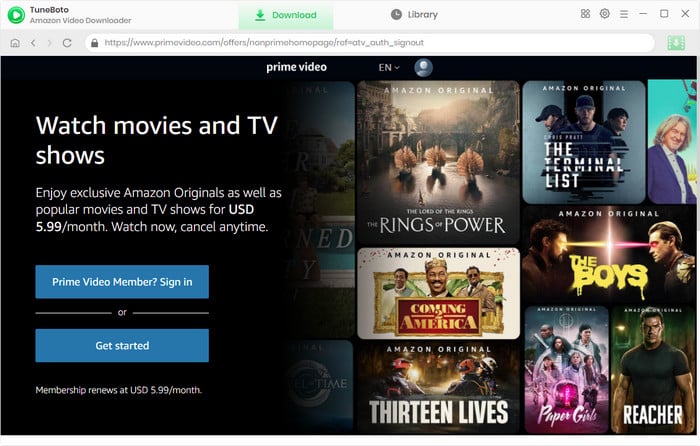
- Output Format: MP4 and MKV.
- Streaming Quality: True lossless 1080p HD.
- Audio & Subtitles: Retains 5.1 Dolby Digital surround sound and allows you to save multi-language subtitles as internal, external (SRT files), or hardcoded text.
- Batch Downloading: Yes, you can queue an entire season of The Boys and let it run while you sleep.
Amazon Video Downloader
-
Download Prime Video anime and movies to PC/Mac as standard MP4 or MKV files.

-
Keep multi-language audio tracks and subtitles (up to 1080P).
-
Play downloaded videos on VLC, USB drives, TVs, or smartphones.
-
Bypass the 48-hour expiration limit—keep your episodes forever.
-
Supports batch downloads for faster library building


2. VidiCable (Best All-in-One Solution)
If your streaming habits extend far beyond just Amazon Prime, VidiCable is an incredibly versatile piece of software. It acts as an all-in-one video downloader, supporting a massive array of platforms including Amazon, Netflix, Disney+, Hulu, and even free sites like YouTube and Vimeo.
- Output Format: MP4 and MKV.
- Streaming Quality: Up to 1080p HD (depending on the source platform).
- Audio & Subtitles: Excellent preservation of original audio tracks and multilingual subtitles.
- Interface: Features a built-in browser system, allowing you to search for content directly inside the app without needing to copy and paste URLs.
3. KeepStreams for Amazon
KeepStreams is a premium, high-end downloader that aims to replicate the browser experience right inside the application.
- Output Format: MP4 format.
- Streaming Quality: 1080p HD.
- Audio & Subtitles: Supports EAC3 5.1 audio and automated subtitle extraction.
- Ad-Removal: Automatically detects and strips out commercial breaks if you are using an ad-supported Prime tier.
Best Amazon Video Downloaders for Mobile (Android & iOS)
Downloading directly to your smartphone or tablet comes with a unique set of challenges. Because Apple and Google strictly regulate their app stores, finding an app that actively strips DRM on mobile is incredibly difficult. Here are the three best ways to handle mobile offline viewing.
4. The Official Amazon Prime Video App (🏆 Best for Casual Use)
We have to mention the elephant in the room. For 80% of casual viewers who just need something to watch on the subway tomorrow morning, the official app does the job perfectly.
- How it works: Simply tap the "Download" icon next to any supported movie or episode.
- Pros: It is 100% legal, entirely safe, completely free (with your Prime subscription), and offers excellent video quality optimized for your specific phone screen.
- Cons: The notorious 48-hour expiration limit. Once you hit play, the clock starts ticking. Furthermore, the files are hidden deep in your phone's system and heavily encrypted—you cannot move them to another device.
5. PlayOn Cloud
PlayOn Cloud takes a fascinating approach to bypassing mobile restrictions. Instead of downloading the file directly, it operates as a cloud-based DVR.
- How it works: You browse Amazon inside the PlayOn app and hit "Record." PlayOn’s remote servers will literally play the movie in real-time and record the screen. Once finished, they send a standard, DRM-free MP4 file directly to your phone.
- Pros: Completely bypasses DRM; the files are yours forever and can be cast to your TV or moved to a PC.
- Cons: You have to pay per recording (using a credit system). Also, because it records in real-time, you have to wait for the movie to finish playing on their servers before you get the file. Quality is generally capped at 720p.
6. StreamFab for Android
For Android power users who refuse to be limited by official apps, StreamFab offers a dedicated mobile APK.
- How it works: It acts much like the desktop software but optimized for a mobile processor, downloading Amazon content as raw MP4 files directly to your phone's local storage.
- Pros: Real MP4 downloads directly to mobile; no expiration dates.
- Cons: Because it violates Google Play Store policies, you have to "sideload" the APK directly from their website, which can be a security concern for novice users. It is also completely unavailable for iOS (iPhone/iPad) users.
Best Amazon Video Downloader Extensions (Chrome, Firefox & Edge)
Before we dive in, you need to understand how streaming technology works. Amazon Video protects its premium movies using military-grade Widevine DRM encryption. Because browser extensions operate on top of the browser, they physically do not have the clearance to decrypt Widevine DRM.
Therefore, no simple Chrome extension can download a premium Amazon Prime movie directly. They will only work on unencrypted trailers, or they require you to screen-record the playback.
7. Video DownloadHelper (🏆 Best General Extension)
With millions of users, this is the most famous downloading extension on the web.
- How it works: The icon in your toolbar spins and lights up when it detects a downloadable video on the page.
- Pros: Incredibly reliable for standard HTML5 videos, Vimeo, and social media clips.
- Cons: It will fail instantly if you try to use it on a DRM-protected Amazon movie. It often requires you to install a separate "Companion App" on your PC to process complex video streams.
8. CocoCut Video Downloader
CocoCut is a fan favorite for users trying to grab highly segmented video streams.
- How it works: It excels at detecting and stitching together HLS (HTTP Live Streaming) and M3U8 files.
- Pros: If direct downloading fails, CocoCut has a built-in "Recording Mode" that allows you to capture the video stream.
- Cons: Recording mode requires you to keep the tab open, keep your computer awake, and let the movie play out in real-time from start to finish.
9. Awesome Screen Recorder
Since direct downloading via extensions is blocked by Amazon, your best fallback on a browser is to simply record your screen.
- How it works: You select the browser tab playing your Amazon movie, hit record, and capture the audio and video playing on your monitor.
- Pros: Completely free to use; bypasses download blockers because it simply captures what your graphics card is rendering.
- Cons: Severe quality loss; potential audio de-syncing; and you cannot use your computer for anything else while it records.
Buying Guide: Desktop vs. Mobile vs. Extension
Still not sure which route to take? Use this quick rubric to identify your ideal software:
- You want to build a Plex server or hard drive library: You absolutely need Desktop Software. Tools like TuneBoto or VidiCable are the only programs capable of providing the 1080p quality, 5.1 surround sound, and SRT subtitle files required for a high-end home theater setup.
- You are traveling tomorrow and need a quick fix: Use the Official Amazon Mobile App. It's not worth paying for third-party software if you just need to keep the kids entertained with an iPad in the backseat. Let the downloads expire when the trip is over.
- You want to save a short, unencrypted video or trailer: Try a Browser Extension. They are free, take two seconds to install, and work great for non-premium, DRM-free web video.
Step-by-Step Guide: How to Download Prime Videos to PC
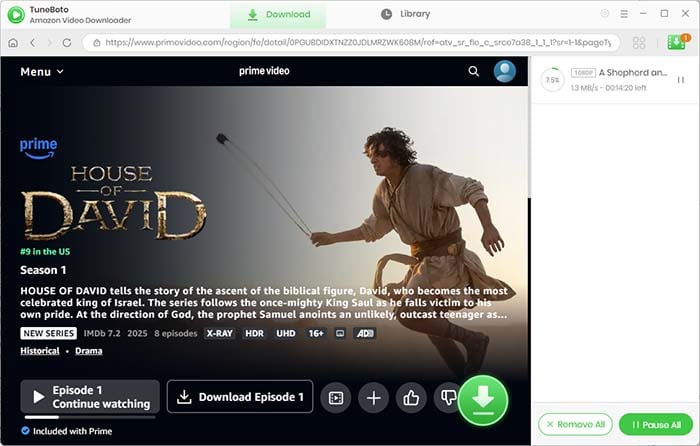
Let’s look at exactly how easy it is to save a movie permanently. For this tutorial, we will use the industry standard, TuneBoto Amazon Video Downloader.
- Step 1: Log in and Search. Launch TuneBoto on your PC or Mac. You will be prompted to log into your Amazon account (this happens securely within the app’s built-in browser). Once logged in, simply type the name of the movie or TV show into the search bar.
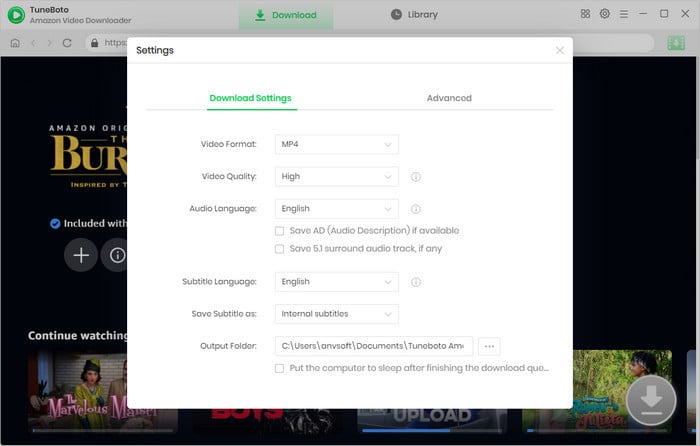
- Step 2: Customize Your Quality Settings. Before downloading, click the "Gear" icon in the top right corner. Here, you can set your output format (choose MP4 for maximum compatibility), video quality (High/1080p), and select which specific audio languages and subtitles you want to keep.
- Step 3: Download and Keep Forever. Find your movie in the search results and click the green "Download" button. TuneBoto will rapidly process the URL, strip the DRM restrictions, and save the pure MP4 file to your local hard drive.
Is It Legal to Download Amazon Prime Videos?
This is a common and highly important question.
Under the concepts of Fair Use and Format Shifting in many jurisdictions, downloading a copy of a video that you legally have access to (via your paid Amazon Prime subscription) for personal, offline viewing falls into a legal grey area but is generally not prosecuted.
However, the moment you upload that downloaded MP4 to the internet, share it on torrent sites, or attempt to sell it, you are committing copyright infringement and piracy. We strongly condemn piracy. Software like TuneBoto should strictly be used to facilitate personal, offline enjoyment within your own household.
Frequently Asked Questions (FAQs)
Q: Does Amazon Prime notify content owners if I download using third-party software?
A: No. Tools like TuneBoto act essentially as a web browser. Amazon recognizes the action as a standard video stream. They do not send notifications to studios or flag your account for utilizing personal downloading software.
Q: Why are my downloaded Amazon videos expiring on my phone?
A: If you used the official Amazon app, it relies on a digital timer. Once you disconnect from the internet or hit the "Play" button, the app gives you exactly 48 hours to finish the content before it locks the file, requiring you to reconnect to Wi-Fi to renew the digital license.
Q: Can I transfer downloaded Prime movies to a USB drive?
A: If you download them using the official mobile app or Windows 10 app, no. The files are encrypted. If you download them using desktop software like VidiCable or TuneBoto, yes. They are saved as standard MP4 files, which can be dragged and dropped onto any USB drive or external hard drive.
Conclusion
The streaming landscape is becoming increasingly fragmented, and renting movies only to have them expire on your device 48 hours later feels like a step backward in technology.
If you want to take back control of your media, relying on the official mobile app is fine for a quick commute, but it won't help you build a permanent library. For serious viewers, dedicated desktop software is the only logical choice.
With its flawless DRM-removal engine, lossless 1080p output, and user-friendly interface, TuneBoto Amazon Video Downloader remains our number one recommendation for 2026. Alternatively, if you want to branch out and record from multiple platforms, VidiCable is a spectacular runner-up. Stop letting your downloads expire. Pick the right tool, save your MP4s, and enjoy your movies offline!