Disney Plus Download Limit Explained: Offline Viewing Rules, Expiration & Restrictions
Learn how Disney+ download limits work, how many videos you can save, why downloads expire or disappear, and how to enjoy Disney+ videos offline more flexibly.
- Does Disney+ Have a Download Limit?
- How Many Downloads Can You Have on Disney+?
- How Long Do Disney+ Downloads Last?/a>
- Why Did My Disney+ Downloads Disappear?
- Can You Keep Disney+ Downloads Forever?
- Disney+ App Download vs TuneBoto Video One
- How to Download Disney+ Videos for Flexible Offline Viewing
Does Disney+ Have a Download Limit?
Yes. Disney+ offline downloads come with several restrictions, including device limitations, storage limits, content availability, and expiration rules.
Unlike normal video files, Disney+ downloads are stored inside the Disney+ app and cannot be transferred, copied, or played with other media players.
How Many Downloads Can You Have on Disney+?
Disney+ does not provide a simple fixed number for the maximum downloads available per account. The number of videos you can save depends on your device storage, supported devices, and the availability of each title.
Disney+ offline downloads are designed for temporary viewing. They allow subscribers to watch movies and shows without an internet connection, but the downloaded content remains protected inside the Disney+ application.
| Feature | Disney+ Offline Downloads |
|---|---|
| Download availability | Supported Disney+ mobile devices |
| Storage location | Inside Disney+ App |
| Offline playback | Only through Disney+ App |
| Transfer downloads | Not supported |
| Keep downloads forever | No |
How Long Do Disney+ Downloads Last?
Disney+ downloads are not permanent. The availability period depends on content licensing agreements and Disney+ offline viewing rules.
In general, downloaded titles may expire when:
- The download period ends.
- The title is removed from Disney+.
- Your Disney+ subscription expires.
- The offline viewing requirements are no longer met.
Why Did My Disney+ Downloads Disappear?
Many Disney+ users experience missing downloads. This usually happens because offline videos are linked to your Disney+ account and app instead of being saved as regular video files.
1. Your Disney+ Subscription Expired
Disney+ offline downloads require an active subscription. Once your subscription ends, downloaded videos are no longer available.
2. The Download Expiration Period Ended
Disney+ may automatically remove access to downloaded content after the allowed offline viewing period expires.
3. The Movie or Show Left Disney+
Streaming libraries change frequently. If a title is removed from Disney+, your downloaded copy may disappear.
4. The Disney+ App Was Removed
Because downloads are stored inside the Disney+ app, uninstalling the application can remove offline content.
Can You Keep Disney+ Downloads Forever?
No. Official Disney+ downloads cannot be permanently saved. They are encrypted offline files that only work inside the Disney+ application.
- Cannot be copied to USB drives
- Cannot be transferred to another device
- Cannot be played with VLC or other media players
- Cannot be watched after subscription cancellation
Disney+ App Download vs TuneBoto Video One
The official Disney+ download feature is convenient, but it is limited to the Disney+ ecosystem. TuneBoto Video One provides a more flexible way to manage offline videos from supported streaming platforms.
| Feature | Disney+ App | TuneBoto Video One |
|---|---|---|
| Offline watching | Yes | Yes |
| Requires streaming app | Yes | No |
| Download expiration | Yes | No |
| Transfer to devices | No | Yes |
| Flexible playback | Limited | More flexible |
How to Download Disney+ Videos for Flexible Offline Viewing
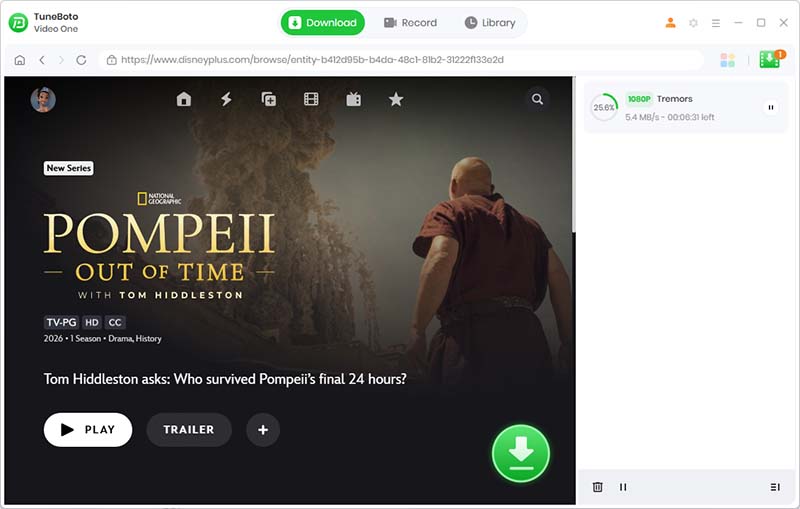
With TuneBoto Video One, you can save streaming videos and enjoy offline watching without being limited to a single streaming app.

TuneBoto Video One
-
Download Disney+ videos to PC/Mac as standard MP4 or MKV files.

-
Output to universal MP4/MKV format (fully compatible with AE, PR, and CapCut).
-
Preserve surround audio and save subtitles separately.
-
Hardware acceleration enabled for faster downloads.
-
Free technical support and automatic updates.
Download and install TuneBoto Video One on your Windows or Mac computer, then launch the software.
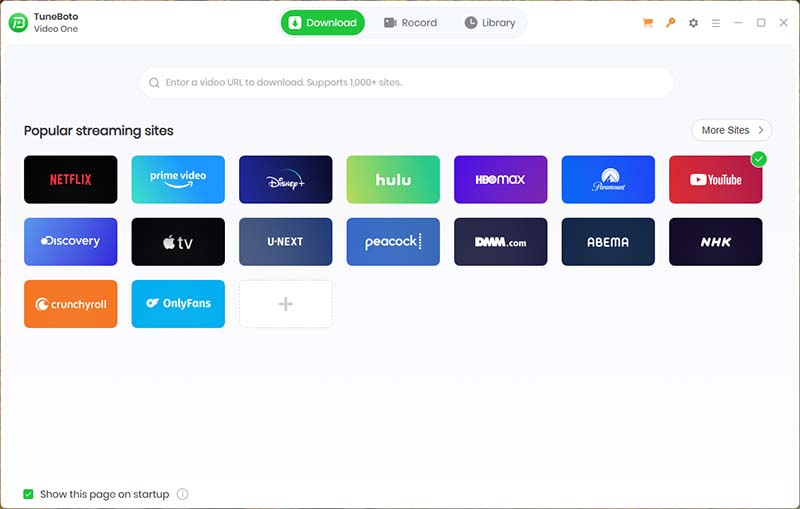
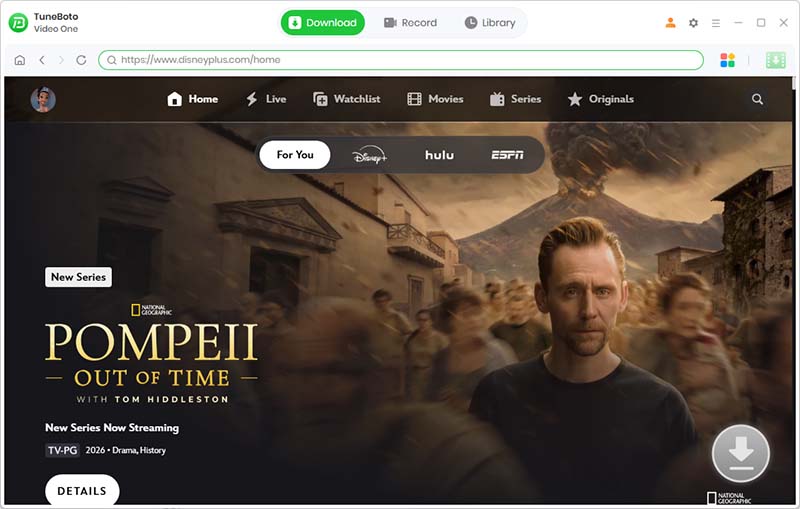
Open the downloader and search for your favorite Disney+ movies or shows.
Click the Advanced Download Window, and select available video quality and audio options.
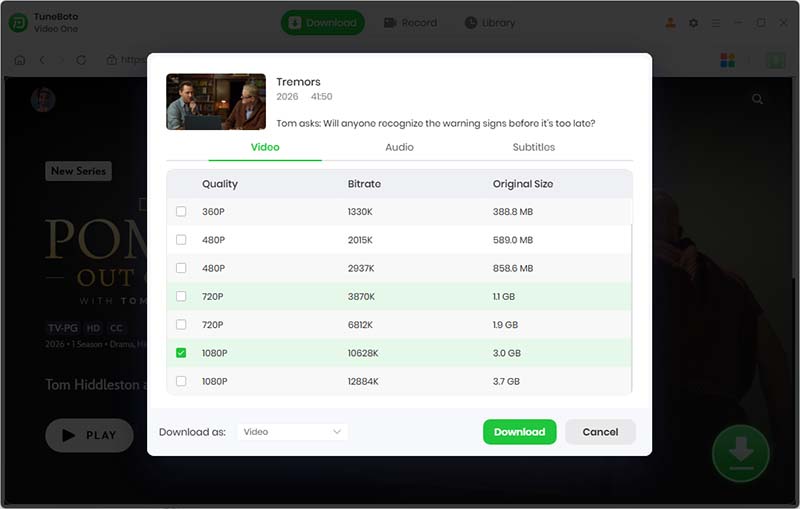
Click "Download" button to start downloading and then watch the downloaded videos offline as you like.
Enjoy Streaming Videos Offline Without App Restrictions
Discover a more flexible way to manage your favorite streaming videos.
 Try Video One for Win
 Try Video One for Mac
Disney+ Download Limit FAQs
How many Disney+ movies can I download?
Disney+ does not provide a specific download number for all users. The available downloads depend on factors such as your device storage, the number of supported devices, and whether the selected content is still available on Disney+.
Does Disney+ limit downloads?
Yes. Disney+ downloads are subject to several limitations, including device restrictions, download expiration rules, and content licensing agreements. Some downloaded videos may also need to be renewed by connecting to the internet.
Can I keep Disney+ downloads forever?
No. Disney+ downloads are temporary offline files that can only be accessed through the Disney+ app. They may expire when your subscription ends, when the content license changes, or when the download period expires.
How long do Disney+ downloads last?
The expiration time for Disney+ downloads depends on the specific title and licensing conditions. Some downloads may require you to reconnect to the internet within a certain period to remain available for offline viewing.
Can I watch Disney+ downloads without the Disney+ app?
No. Disney+ offline downloads are protected files that can only be played inside the official Disney+ application on supported devices. They cannot be transferred to other media players or devices.
How can I save Disney+ videos for more flexible offline viewing?
If you need more flexibility for offline viewing, TuneBoto Video One supports downloading videos from 1,000+ streaming platforms and websites. It allows you to save videos in high quality and watch them on more devices without being limited by the original streaming app's offline restrictions.
Conclusion: Download Disney+ Videos Without Being Limited by App Restrictions
Disney+ offline downloads are a convenient way to watch your favorite movies and shows without an internet connection. However, these downloads come with several limitations, including device restrictions, download expiration, content availability changes, and the requirement to watch videos inside the Disney+ app.
For most users, the built-in Disney+ download feature works well for temporary offline viewing. But if you want more flexibility, such as keeping downloaded videos longer, watching them on different devices, or building your own offline video library, you may need a more versatile solution.
TuneBoto Video One provides an alternative way to save videos from popular streaming platforms. It supports downloads from 1,000+ websites and streaming services, allowing you to save videos in high quality and watch them offline on more devices without being restricted by the original streaming app.
With TuneBoto Video One, you can enjoy your favorite movies and shows anytime, even when you are traveling, have limited internet access, or no longer have access to a streaming subscription.

Ethan Cole | Senior Editor
