

As the year winds down, music enthusiasts worldwide eagerly await their Spotify Wrapped 2025, the ultimate Spotify year in review that transforms your streaming habits into an engaging, shareable story. This popular feature highlights your top artists on Spotify, most listened songs, favorite genres, and unique stats like total listening time and global comparisons. Whether you're curious about how to access Spotify Wrapped, wondering if you need Spotify Premium for Wrapped, or seeking ways to download Spotify Wrapped playlists for offline listening, this in-depth guide covers the top Spotify Wrapped questions for 2025. Packed with tips on checking your most played artists on Spotify and even creating your own Spotify Wrapped alternative, we'll help you make the most of this annual music recap. Dive in to unlock the secrets of your Spotify listening history and enhance your audio experience.
- 1. What is Spotify Wrapped?
- 2. How to Open Spotify Wrapped?
- 3. Do You Need Premium for Spotify Wrapped?
- 4. When Does Spotify Wrapped 2025 Come Out?
- 5. Can You Access Previous Spotify Wrapped?
- 6. Why Is My Spotify Wrapped Not Out?
- 7. How to Check Most Played Artists on Spotify?
- 8. How to Edit Spotify Wrapped?
- 9. How to Make Your Own Spotify Wrapped?
- 10. Can You Download Spotify Wrapped Playlists for Offline Playing?
What is Spotify Wrapped?
Spotify Wrapped is Spotify's annual music recap feature that delivers a personalized summary of your listening activity throughout the year, making it a must-see for anyone tracking their Spotify year in review. Released each December, Spotify Wrapped 2025 compiles data from your streams between January and late October or November, showcasing your top songs on Spotify, most played artists, preferred genres, podcasts, and fun insights like your "audio aura" or how your tastes stack up against others worldwide.
The appeal of Spotify Wrapped lies in its interactive, visually stunning presentation—think animated slideshows, colorful graphics, and surprising revelations, such as being in the top percentile of listeners for a breakout artist. This Spotify music recap has evolved into a viral sensation, with users sharing their Spotify Wrapped stories on social media, inspiring playlist exchanges and music discussions. For newcomers wondering what is Spotify Wrapped, it's essentially a free, data-driven celebration of your musical year, helping you rediscover hidden gems and get tailored recommendations. By integrating Spotify Wrapped into your routine, you can reflect on evolving preferences, from indie vibes to pop anthems, and plan your 2026 listening adventures accordingly.
How to Open Spotify Wrapped
Accessing your Spotify Wrapped 2025 is simple and user-friendly, whether you're on mobile, desktop, or web—perfect for those searching how to open Spotify Wrapped quickly. Upon release, Spotify sends notifications via the app, email, or in-app alerts to guide you. To manually find it, launch the Spotify app on iOS, Android, or desktop, and check the home screen for the eye-catching Spotify Wrapped banner, often labeled "Your 2025 Wrapped" or similar.
If it's not immediately visible, use the search function by typing "Spotify Wrapped 2025" or "my Spotify Wrapped" to locate the dedicated section. On the spotify.com website, log in and look for the Wrapped hub on the homepage during the launch window. For the best experience, update your app to avoid glitches, as Spotify Wrapped features interactive elements that require the latest version. This seamless process makes how to open Spotify Wrapped accessible to all, turning your Spotify year in review into an instant highlight. Share your findings easily with built-in tools, amplifying the social buzz around this beloved music recap.
Do You Need Premium for Spotify Wrapped?
A common query is do you need Premium for Spotify Wrapped? The answer is no—Spotify Wrapped 2025 is free for all users with an active account and sufficient listening history, regardless of subscription tier. This inclusivity ensures everyone can enjoy their Spotify music recap without upgrading, though Spotify Premium users benefit from ad-free viewing and extras like AI-generated playlists inspired by your Wrapped data.
Free account holders might see brief ads in the slideshow, but core elements like top artists on Spotify and most listened songs remain fully available. To qualify for a robust Spotify Wrapped, aim for consistent streaming; even ad-supported listens contribute to your stats. This approach democratizes the feature, encouraging broader engagement with Spotify's ecosystem and boosting user loyalty. If you're debating Premium, know that Spotify Wrapped alone doesn't require it, but perks like offline downloads enhance the overall experience tied to your music recap.
When Does Spotify Wrapped 2025 Come Out?
Anticipation builds around when does Spotify Wrapped 2025 come out, and based on consistent patterns, it's slated for early December, with a probable release on Wednesday, December 3, 2025. Spotify typically drops this music recap mid-week to capitalize on weekend sharing, as evidenced by past launches like December 4, 2024, and November 29, 2023. While not officially confirmed, experts from sources like Forbes and People predict this date, aligning with Spotify's strategy for maximum impact during the holiday season.
As of December 2, 2025, if your Spotify Wrapped 2025 isn't available yet, enable app notifications and check back soon—global rollouts ensure near-simultaneous access. Once live, it stays up for months, giving ample time to explore your Spotify year in review. Factors like regional variations might cause minor delays, but teasers on Spotify's social channels often signal the imminent drop, heightening excitement for this annual event.
Can You Access Previous Spotify Wrapped?
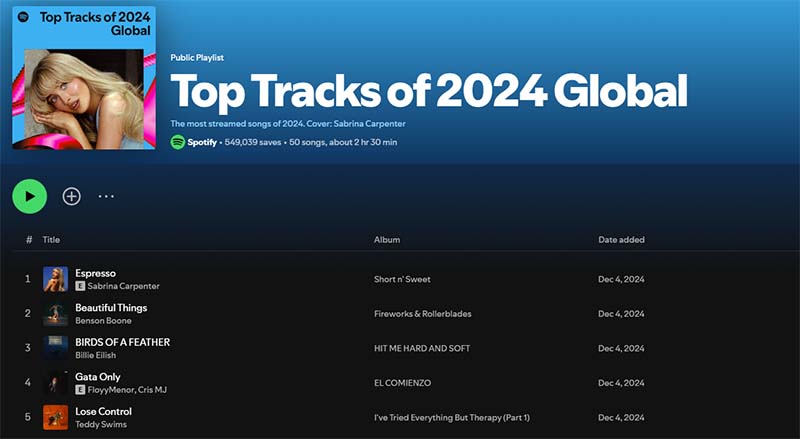
Many users ask can you access previous Spotify Wrapped, and yes, you can revisit key components like past Top Songs playlists, even if full slideshows fade over time. For Spotify Wrapped 2024 or earlier, search "Your Top Songs 2024" in the app or use URIs like "spotify:special:2024" to pull up archived playlists, preserving your historical music recap.
These endure in your library, often auto-saved, allowing comparisons of evolving tastes across years. While detailed stats like listening minutes aren't always directly viewable, exporting data from Spotify's privacy settings provides raw insights for deeper analysis. Community resources, including Reddit discussions, confirm this method works for playlists dating back several years, making it easy to access previous Spotify Wrapped elements. This nostalgia feature enriches your Spotify experience, bridging past and present music journeys.
Why Is My Spotify Wrapped Not Out?
If you're wondering why is my Spotify Wrapped not out, common culprits include timing, app updates, or eligibility. As of December 2, 2025, Spotify Wrapped 2025 may not be released yet, with expectations pointing to December 3—double-check the official rollout. Update your app, clear cache, or restart your device to resolve visibility issues.
Minimal listening activity or shared accounts might delay it; ensure individual logins for family plans. Server traffic during launch can cause temporary hiccups—patience often pays off. For persistent problems, consult Spotify support or forums. Once available, your Spotify music recap will reveal why the wait was worth it, packed with personalized insights.
How to Check Most Played Artists on Spotify
Figuring out how to check most played artists on Spotify is key for music fans, and Spotify Wrapped 2025 prominently features your top 5-10 with detailed metrics. Year-round, navigate to "Your Library" for monthly or all-time top artists on Spotify views. For comprehensive data, download your streaming history via the privacy dashboard, emailed as a file for custom analysis.
Third-party apps like Stats for Spotify offer visualizations of most played artists over specific periods, integrating securely with your account. This functionality helps track obsessions, uncover patterns, and explore similar recommendations, enhancing your Spotify year in review beyond Wrapped season.
How to Edit Spotify Wrapped
Queries about how to edit Spotify Wrapped arise often, but direct post-generation edits aren't feasible since it's derived from fixed data. Influence future recaps by excluding tracks from your Taste Profile—tap the three dots on a song and select "Exclude" to refine recommendations and stats.
For sharing, customize Wrapped cards with text or stickers in-app before posting. External tools like Kapwing provide editable templates for fun mockups, though they don't change official data. Proactively shape your Spotify Wrapped 2025 by mindful streaming, ensuring a truer reflection of your music tastes.
How to Make Your Own Spotify Wrapped
Learning how to make your own Spotify Wrapped empowers customization beyond the official version. Export your data from Spotify's privacy tools, then use Python with libraries like Spotipy to generate stats on top songs and artists. Design visuals with Canva or Kapwing templates, inputting manual insights for a personalized music recap.
Integrate with last.fm for receipt-style summaries via apps like Receiptify. This DIY approach suits those wanting unique twists on Spotify Wrapped, ideal for sharing or thematic recaps outside music.
Can You Download Spotify Wrapped Playlists for Offline Playing?
Yes, downloading Spotify Wrapped playlists for offline playing is possible, especially using tools like Macsome Spotify Downloader for versatile, high-quality conversions. This software enables free and Premium users to save Spotify Wrapped 2025 playlists, such as Your Top Songs, in formats like MP3, FLAC, or WAV, complete with metadata and up to 320kbps audio—surpassing Spotify's temporary offline mode.
Spotify Music Converter
-
Download Spotify songs, playlists, audiobooks, and podcasts with high quality.

-
Convert Spotify songs to MP3, AAC, WAV, FLAC, AIFF, or ALAC.
-
Download music from both the Spotify app and the Spotify web player.
-
One-click to burn CDs & Import Spotify songs to Amazon Music / Apple Music.
-
Free upgrade and technical support
Steps to Download Your Spotify Wrapped Playlist
- Step 1. Click the download button above to install Macsome on Mac or Windows.
- Step 2. Launch it to access Spotify's interface, and add your Wrapped playlist.
- Step 3. Select MP3, AAC, or WAV, and adjust quality settings (up to 320kbps)..
- Step 4. Click "Convert" to download your tracks. Save them to your device for offline listening.
Praised for its intuitive design and speed, it earns high marks on review sites for reliable offline access. Adhere to terms for personal use only, making Macsome a top choice for enjoying your Spotify music recap anywhere without connectivity.
Conclusion
In wrapping up, Spotify Wrapped 2025 stands as the pinnacle of personalized music recaps, offering insights into your top artists on Spotify, most listened songs, and yearly evolution. From accessing previous Wrapped to troubleshooting why your Spotify Wrapped isn't out, this guide addresses key concerns while highlighting tools for offline downloads and custom creations. Embrace your Spotify year in review, share the vibes, and let it inspire fresh discoveries. As streaming trends shift, Spotify Wrapped remains a timeless way to celebrate soundtracks of life—stay tuned for more musical magic!
Bonus: Download Amazon Music Playlist to Spotify
Uploading your Amazon Music playlist to Spotify lets you enjoy Spotify’s social features, personalized playlists, and device compatibility while keeping your favorite tracks. TuneBoto Amazon Music Downloader simplifies this by converting playlists to MP3s—just log in, select your playlist, choose MP3, and convert. Then, import the files into Spotify via “Local Files” settings for a quick, easy switch.
Amazon Music Converter
-
Download Amazon Music songs, albums, playlists & podcasts to local computer
-
Convert Amazon Music songs to MP3, AAC, WAV, FLAC, AIFF, ALAC
-
Keep ID3 tags and lyrics; 100% original audio quality up to Ultra HD & HD
-
10X download speed & batch download playlists/albums
-
Archive downloaded songs by album/artist/playlist
-
Handy tools: Format Converter, Tag Edit, Burn CD and Export to iTunes/Music


Gabrielle Miller | Senior Editor

