In today’s digital world, video content is everywhere — from tutorials and lectures to entertainment and social media clips. While YouTube makes streaming effortless, there are times when you want to watch videos offline or save them for personal use. That’s where free YouTube to MP4 sites come in. These online tools allow you to convert YouTube videos into MP4 files that can be downloaded and played on any device, even without internet access.

Finding a safe, reliable, and high-quality converter isn’t always easy. Many websites promise free downloads but bombard users with ads, slow conversions, or even malware. This guide brings together the best free YouTube to MP4 sites in 2026, helping you choose the right platform for your needs. We’ll explore each tool’s features, supported resolutions, pros and cons, and safety tips.
Additionally, we’ll provide a step-by-step conversion guide, answer common questions, and cover legal considerations. Whether you’re a student saving educational videos, a traveler who wants offline entertainment, or a content creator repurposing clips, this article will help you navigate free YouTube to MP4 options safely and efficiently.
Table of Contents
Why Use Free YouTube to MP4 Sites
Free YouTube to MP4 sites offer a convenient way to save videos offline for personal use. The benefits include:
- Offline Viewing: Stream videos without an internet connection, perfect for traveling or areas with poor connectivity.
- Device Compatibility: MP4 is universally supported on smartphones, tablets, smart TVs, and PCs.
- Quick Access: Convert and download videos within seconds without installing heavy software.
- Flexibility: Choose resolutions like 720p, 1080p, or even 4K depending on your device storage and quality preferences.
However, there are some considerations to keep in mind. Not all converters are safe, and downloading copyrighted content may violate YouTube’s Terms of Service. This is why selecting a trusted platform and using these sites responsibly is critical.
Best Free YouTube to MP4 Sites – Quick Picks (2026)
🏆 Best Overall
YTMP4
Best balance of speed, simplicity, and low ad interference. Ideal for most users who want fast and safe MP4 downloads.
🛡️ Safest Option
SaveFrom.net
Long-established brand with stable performance and clear download flow. Suitable for users prioritizing reliability.
⚡ Fastest Converter
Y2Mate
Known for rapid processing and wide resolution support, especially for HD videos.
Top Free YouTube to MP4 Sites in 2026
1. YTMP4
YTMP4 is a popular online tool that allows users to convert YouTube videos into MP4 format quickly and efficiently. It supports multiple resolutions including 720p and 1080p and does not require registration. The platform is lightweight, fast, and features a clean interface that makes it easy even for beginners.
Key Features
- Free YouTube to MP4 conversion without registration
- Clean and minimal interface
- Fast processing speed
- Works on desktop and mobile browsers
Pros
- Very easy to use
- Low ad interference
- No software installation required
Cons
- Only supports YouTube videos
- No batch downloads
Supported Resolutions
720p, 1080p (depending on original video quality)
Limitations & Safety Notes
Designed for personal use only. Users should avoid downloading copyrighted content without permission.
2. Y2Mate
Y2Mate allows free YouTube to MP4 conversions with a wide variety of format options, including MP4 and MP3. It supports resolutions from 360p up to 1080p and provides a smooth, intuitive interface. Although the website contains some ads, it remains one of the fastest and most reliable converters available. Users can download videos directly without creating an account. It also provides mobile-friendly functionality, making it easy to download and watch videos on the go. With its versatility, Y2Mate is suitable for both casual users and those seeking HD downloads.
Key Features
- Supports MP4 and MP3 formats
- No account registration required
- Compatible with mobile and desktop devices
Pros
- Wide range of output qualities
- Fast conversion
Cons
- Contains noticeable ads
- Pop-ups may appear
Supported Resolutions
360p, 480p, 720p, 1080p
Limitations & Safety Notes
Avoid clicking unrelated download buttons. Do not install additional browser extensions offered by ads.
3. SaveFrom.net
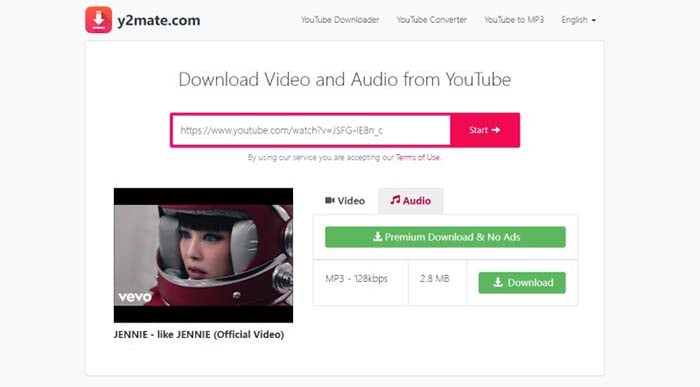
SaveFrom.net is a trusted YouTube to MP4 converter offering quick downloads and multiple quality options. The site also provides a browser extension for faster access. Users can choose resolutions ranging from 360p to 1080p and enjoy a reliable conversion process without software installation. Although pop-ups can appear occasionally, SaveFrom.net remains a solid choice for safe downloads. The platform supports a variety of devices and provides simple instructions for users of all skill levels. Its reputation as a longstanding converter makes it a preferred option for many.
Key Features
- Browser extension available
- Quick MP4 downloads
- Simple copy-and-paste workflow
Pros
- Trusted brand
- Easy to use
Cons
- Occasional pop-ups
- Some features region-limited
Supported Resolutions
360p, 720p, 1080p
Limitations & Safety Notes
Browser extensions should be installed cautiously and reviewed for permissions.
4. OnlineVideoConverter
OnlineVideoConverter is a versatile web-based tool that allows users to convert YouTube videos into MP4 and other popular formats without installing any software. It supports HD video downloads and works smoothly across desktop and mobile browsers, making it a flexible choice for users who want quick online conversions.
Key Features
- Supports multiple video formats including MP4
- No registration required
- Works on desktop and mobile devices
Pros
- Simple conversion process
- Supports HD quality downloads
Cons
- Contains ads
- Conversion speed may vary during peak hours
Supported Resolutions
480p, 720p, 1080p
Limitations & Safety Notes
Avoid clicking third-party ads. Best used for short to medium-length videos.

5. FLVTO
FLVTO is a free online converter that supports MP4 downloads with options for high-quality video. The website provides fast conversion, a simple interface, and compatibility with multiple devices. Users can download videos in 720p or 1080p formats, making it suitable for casual and HD content needs. Although pop-up ads may occasionally appear, FLVTO remains popular for its speed and reliability. Its lightweight design ensures users can quickly convert videos without complications, and it’s suitable for both desktop and mobile use.
Key Features
- Fast YouTube to MP4 conversion
- No account or login required
- Supports desktop and mobile browsers
Pros
- Quick conversion speed
- Easy-to-use interface
Cons
- Pop-up ads may appear
- Limited advanced settings
Supported Resolutions
720p, 1080p
Limitations & Safety Notes
Do not download additional software suggested by ads. Intended for personal use only.

6. ClipConverter.cc
ClipConverter.cc allows users to convert and download YouTube videos to MP4, AVI, MOV, and other formats. The site supports resolutions from standard definition to full HD. Its user-friendly interface simplifies the download process, making it accessible even to beginners. ClipConverter.cc also includes browser extension options for faster conversions. While occasional ads appear, the platform emphasizes security and speed, ensuring a safe download experience. It is a reliable choice for those needing versatile format options for personal use or device compatibility.
Key Features
- Supports MP4, AVI, and MOV formats
- Customizable video quality settings
- Optional browser extension
Pros
- Flexible format and quality options
- Trusted and widely used
Cons
- Ads present on the site
- Interface slightly dated
Supported Resolutions
360p, 480p, 720p, 1080p
Limitations & Safety Notes
Browser extensions should be reviewed carefully before installation.
7. KeepVid
KeepVid provides free online YouTube to MP4 conversions with a focus on speed and quality. Users can select from multiple resolutions, including HD options, and download directly without account creation. KeepVid supports a range of devices, including smartphones, tablets, and desktops. The site features a straightforward interface and emphasizes safety, although users may encounter some advertisements. KeepVid is ideal for users seeking a fast, reliable, and safe platform to download personal videos for offline viewing.
Key Features
- Online YouTube to MP4 conversion
- No registration required
- Compatible with multiple devices
Pros
- Fast download speed
- Simple and clean workflow
Cons
- Advertisements displayed
- Limited advanced features
Supported Resolutions
360p, 720p, 1080p
Limitations & Safety Notes
Stick to the main download button to avoid misleading ads.
8. YT1s.com
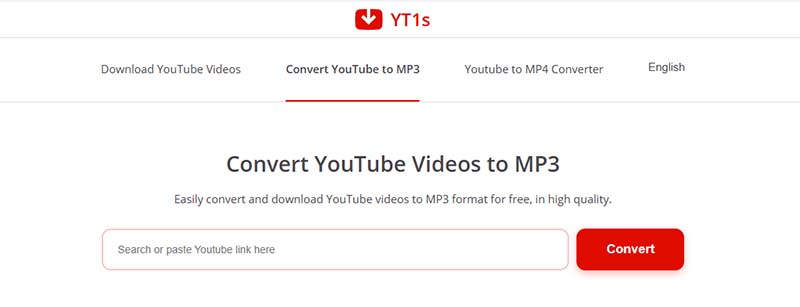
YT1s.com is a simple online YouTube to MP4 converter offering fast and efficient downloads. The site supports multiple resolutions up to 1080p and works on both mobile and desktop devices. Its clean interface makes the conversion process straightforward for beginners. Users can quickly paste the video URL, choose the desired quality, and download the file in seconds. While ads are present, the site maintains reliable performance and security for personal video downloads, making it a solid choice among free converters.
Key Features
- Quick online MP4 conversion
- No account required
- Mobile-friendly interface
Pros
- Easy for beginners
- Fast processing
Cons
- Ad-supported
- No batch download option
Supported Resolutions
360p, 720p, 1080p
Limitations & Safety Notes
Users should close pop-ups and avoid third-party redirects.
9. VidPaw
VidPaw is a versatile online YouTube downloader that allows conversion to MP4 and other formats. It supports multiple resolutions, including 720p and 1080p, and is compatible with desktop and mobile devices. The platform emphasizes user safety and provides clear instructions for smooth conversions. Although some advertisements are displayed, VidPaw offers fast download speeds and a simple interface suitable for beginners and advanced users alike. It is widely used for personal downloads of YouTube videos.
Key Features
- Supports MP4 and other formats
- HD video downloads available
- Works on desktop and mobile devices
Pros
- Clear user interface
- Reliable conversion speed
Cons
- Ads present
- Some features may be limited online
Supported Resolutions
720p, 1080p
Limitations & Safety Notes
Online version is best suited for short to medium-length videos.
10. 2conv.com
2conv.com allows free YouTube to MP4 downloads in various quality options, including HD. The site is fast, user-friendly, and supports multiple devices. Its interface is simple and intuitive, making it accessible for beginners. While some pop-ups appear, 2conv.com is considered safe for personal video downloads. Users can quickly convert videos by pasting the URL, selecting the desired resolution, and downloading the MP4 file. The platform remains a popular choice for those seeking quick and reliable conversions without software installations.
Key Features
- Free online YouTube to MP4 conversion
- No registration required
- Simple copy-and-paste workflow
Pros
- Fast and straightforward
- Works on most devices
Cons
- Pop-up ads may appear
- No advanced customization
Supported Resolutions
360p, 720p, 1080p
Limitations & Safety Notes
Avoid installing any promoted third-party tools. Use for personal purposes only.
Comparison Table
| Site | Quality Options | Ads | Mobile Support | Conversion Speed |
|---|---|---|---|---|
| YTMP4 | 720p, 1080p | Low | ✅ | Fast |
| Y2Mate | 360p–1080p | Medium | ✅ | Fast |
| SaveFrom.net | 360p–1080p | Medium | ✅ | Medium |
| OnlineVideoConverter | 480p–1080p | Medium | ✅ | Fast |
| FLVTO | 720p–1080p | Medium | ✅ | Fast |
| ClipConverter.cc | 360p–1080p | Medium | ✅ | Fast |
| KeepVid | 360p–1080p | Medium | ✅ | Fast |
| YT1s.com | 360p–1080p | Medium | ✅ | Fast |
| VidPaw | 720p–1080p | Medium | ✅ | Fast |
| 2conv.com | 360p–1080p | Medium | ✅ | Fast |
Step-by-Step Guide: How to Convert YouTube to MP4 Online Free
Converting YouTube videos to MP4 using free online sites is simple and takes just a few minutes. This guide uses a general process applicable to most tools like Y2Mate or Cobalt. For best quality, choose sites supporting higher resolutions and avoid peak hours for faster speeds. Always select MP4 for broad compatibility.
- Step1. Copy the YouTube Video Link
Open YouTube in your browser, find the video, and copy its URL from the address bar or share button. - Step2. Paste the YouTube Link into the Converter
Visit your chosen site (e.g., y2mate.com) and paste the link into the search field. The tool will analyze the video automatically. - Step3. Pick Resolution/Quality
Select MP4 as the format and choose your desired quality—opt for 1080p or higher for HD, but note higher resolutions increase file size. Tips: For mobile, 720p balances quality and storage; enable subtitles if available. - Step4. Start Conversion
Click "Convert" or "Download." The site processes the video, which may take seconds to minutes depending on length and server load. - Step5. Download and Save
Once ready, click the download button. Save the MP4 file to your device. Scan with antivirus for safety, and organize in a dedicated folder.
Tips: Ensure device storage is sufficient, avoid simultaneous conversions, and scan downloads for malware.
Safety, Legality & Best Practices
- Download videos only for personal use or when authorized.
- Stick to reputable sites to avoid malware and excessive ads.
- Consider YouTube Premium for legal offline downloads.
- Do not share personal credentials or sensitive data on converter sites.
Conclusion
Free YouTube to MP4 sites are a convenient solution for offline viewing and device compatibility. Platforms like YTMP4, Y2Mate, and SaveFrom.net provide fast, reliable, and safe downloads. Remember to follow legal guidelines and safe downloading practices. Use this guide to select the best site, convert videos efficiently, and enjoy high-quality content offline.
Explore more video downloading guides and YouTube MP3 converters.
Bonus: Expand Offline Viewing Options with TuneBoto
For YouTube users looking to expand their offline viewing options, TuneBoto Amazon Video Downloader is a game-changer. This tool lets you download Amazon Prime movies and TV shows in HD quality (up to 1080p) as MP4 or MKV files, making them easy to transfer and watch on any device—like your phone, tablet, or even upload to YouTube for personal use. With features like batch downloading, H.265 codec for faster downloads, and preserved metadata, TuneBoto ensures a seamless experience. You can also select audio tracks and subtitles in multiple languages. While Amazon’s official app limits offline playback to its platform, TuneBoto removes those restrictions, giving you freedom to enjoy content anytime, anywhere.

Amazon Video Downloader
- Download Prime movies & TV shows to Mac/Windows

-
Support downloading Prime Video to MP4/MKV
-
Keep audio tracks and subtitles
-
Download videos in batch at a fast speed
-
Free upgrade and technical support



Ethan Cole | Senior Editor

