

Searching for free YouTube to MP3 sites is one of the most common ways people try to save music, podcasts, or long videos for offline listening. Whether you want to convert a music video into an MP3 file, extract audio from a lecture, or save a podcast episode, free online converters promise a quick and simple solution.
However, not all free YouTube to MP3 sites are created equal. Many are overloaded with ads, some limit audio quality, and others stop working without warning. In this comprehensive guide, we’ll walk you through how these sites work, which ones still function reliably in 2026, their limitations, safety concerns, and when it makes sense to consider more stable alternatives.
Table of Contents
- What Are Free YouTube to MP3 Sites?
- Are Free YouTube to MP3 Sites Safe to Use?
- Best Free YouTube to MP3 Sites (Tested & Compared)
- Limitations of Free YouTube to MP3 Sites
- Free YouTube to MP3 Sites vs Desktop Converters
- Best Alternative When Free Sites Stop Working
- FAQs about YouTube to MP3 Sites
- Legal and Copyright Considerations
What Are Free YouTube to MP3 Sites?
Free YouTube to MP3 sites are online tools that allow users to convert YouTube videos into downloadable MP3 audio files directly from a web browser. Unlike desktop software, these sites do not require installation and usually work by pasting a YouTube URL into a conversion box.
Most free converters follow the same basic process: they fetch the video stream from YouTube, extract the audio track, convert it into MP3 format, and then generate a download link. Because everything happens online, they are popular among users who want a quick solution without installing extra software.
That convenience comes with trade-offs. Free YouTube to MP3 sites often limit audio quality, restrict playlist downloads, or rely heavily on advertising to stay online.
Are Free YouTube to MP3 Sites Safe to Use?
Safety is one of the biggest concerns when using free YouTube to MP3 sites. While many are relatively harmless, others can expose users to unnecessary risks.
Common Risks You Should Know
- Malicious ads and redirects: Some sites rely on aggressive ad networks that redirect users to unsafe pages.
- Fake download buttons: Misleading buttons may lead to browser extensions or unwanted software.
- Privacy concerns: Certain sites track user behavior or inject scripts without clear disclosure.
How to Use Free YouTube to MP3 Sites Safely
If you choose to use free online converters, consider these safety tips:
- Use an up-to-date browser with built-in security features.
- Avoid sites that ask you to install additional software.
- Stick to HTTPS-enabled websites.
- Never allow notifications or extensions from unknown converters.
Best Free YouTube to MP3 Sites (Tested & Compared)
After scouring 2026 reviews from sources like NoteBurner, Macsome, TunePat, and ScreenApp, we've curated this list of top performers. We prioritized safety (low ads, no malware reports), speed, and features like audio quality up to 320kbps. Each was evaluated for usability, mobile compatibility, and real-world reliability—no promotional hype, just neutral facts.
| Site Name | Max Quality | Ads | Playlist | Mobile-Friendly |
|---|---|---|---|---|
| YTMP3 | 320kbps | Minimal | ✘ | ✔ |
| Y2Mate | 320kbps | High | ✘ | ✔ |
| EzMP3 (EzConv) | 320kbps | None | ✘ | ✔ |
| OnlyMP3 | 320kbps | None | ✔ | ✔ |
| FLVTO | 320kbps | None | ✘ | ✔ |
| GreenConvert | 320kbps | None | ✘ | ✔ |
| CNV MP3 | 320kbps | None | ✘ | ✔ |
| HireQuotient | 128kbps | None | ✘ | ✔ |
| YT1S | 320kbps | High | ✘ | ✔ |
| SAVEMP3 | 128kbps | None | ✘ | ✔ |
| Loader.to | 320kbps | Low | ✘ | ✔ |
| X2Mate | 320kbps | Medium | ✘ | ✔ |
YTMP3
YTMP3 is a speedy free online YouTube MP3 downloader ideal for quick conversions. It processes URLs in seconds, offering up to 320kbps quality for podcasts or music. Mobile-friendly with no registration needed.
Pros:
- Minimal ads, easily blocked
- HTTPS secure, no malware in 2026 scans
- Fast for short clips
Cons:
- No playlist or batch support
- Quality may drop on long videos
To download YouTube to MP3: Paste video URL into the search bar, select MP3 and bitrate, click convert, then download the file. Scan with antivirus post-download. Best for one-off uses like single songs.
Y2Mate
Y2Mate supports keyword searches and multi-platform conversions (YouTube, Facebook), delivering 320kbps MP3s or alternatives like M4A. It's responsive on mobile for on-the-go use.
Pros:
- Versatile formats and sources
- Quick processing for HD videos
- No installation required
Cons:
- High ads with redirects
- Defaults to lower quality if not set
To download YouTube to MP3: Enter URL or keywords, choose MP3 output and quality, hit download after conversion. Use ad blocker to avoid interruptions. Suited for mixed-media occasional downloads.
EzMP3 (EzConv)
EzMP3 offers ad-free trimming for videos up to 12 hours, with bitrates from 64kbps to 320kbps. It's clean and secure for precise audio clips.
Pros:
- No ads or malware risks
- Audio trimming feature
- Handles long content well
Cons:
- No batch/playlist options
- High bitrates may error
To download YouTube to MP3: Paste URL, trim if needed, select quality, convert and save. Ideal for editing podcasts or lectures without distractions.
OnlyMP3
OnlyMP3 stands out with playlist support and 320kbps quality, integrating Dropbox saves for up to 6-hour videos. Ad-free and efficient.
Pros:
- Batch playlist downloads
- Cloud integration
- Preserves metadata
Cons:
- MP3-only format
- Speed limits on large files
To download YouTube to MP3: Input URL or playlist, choose quality, convert batch, and download or save to cloud. Perfect for curating offline mixes.
FLVTO
FLVTO provides ad-free 320kbps MP3/MP4 from multiple sites, with fast browser-based conversions.
Pros:
- Multi-platform support
- Clean interface, no malware
- Quick for standard videos
Cons:
- Errors on long/restricted content
- No playlists
To download YouTube to MP3: Paste URL, select MP3, convert, and download. Great for safe music grabs on the go.
GreenConvert
GreenConvert features ad-free trimming and 320kbps customization, supporting various resolutions.
Pros:
- Customizable bitrates
- Secure, fast processing
- Auto file naming
Cons:
- No bulk downloads
- Regional restrictions possible
To download YouTube to MP3: Enter URL, trim/choose quality, convert, save. Suited for edited clips like tutorials.
CNV MP3
CNV MP3 is ad-free with 320kbps options and multilingual support, preserving names.
Pros:
- Quick, theme-switching UI
- Global accessibility
- Browser extension integration
Cons:
- 180-minute limit
- No trimming
To download YouTube to MP3: Paste URL, select bitrate, convert/download. Ideal for short international content.
HireQuotient
HireQuotient offers ad-free 128kbps MP3/WAV with SSL security for basic needs.
Pros:
- Enterprise-level safety
- Minimalist design
- Firewall compatible
Cons:
- Slow on large files
- Low quality cap
To download YouTube to MP3: Input URL, choose format, convert/save. Best for professional voice extracts.
YT1S
YT1S allows unlimited 320kbps downloads with multi-formats, but high ads.
Pros:
- High fidelity options
- Direct video search
- AAC support
Cons:
- Redirect risks
- Potential blocks
To download YouTube to MP3: Search or paste URL, select quality, download post-conversion. Use with ad blocker for quality-focused tasks.
SAVEMP3
SAVEMP3 is ad-free with trimming and extensions for mobile use.
Pros:
- One-click browser integration
- Language support
- Low resource use
Cons:
- 128kbps limit
- Hourly caps
To download YouTube to MP3: Paste URL, trim, convert/download. Great for quick mobile snippets.
Loader.to
Loader.to has low ads and 320kbps with FLAC, for audio enthusiasts.
Pros:
- Lossless options
- Progress tracking
- Versatile formats
Cons:
- Banner interruptions
- No true batch
To download YouTube to MP3: Enter URL, choose FLAC/MP3 quality, convert/save. Ideal for hi-fi collections.
X2Mate
X2Mate provides 320kbps tweaks with HD support, medium ads.
Pros:
- Bitrate control
- Quick previews
- Multi-device friendly
Cons:
- Minor redirects
- No batches
To download YouTube to MP3: Paste URL, adjust settings, convert/download. Suited for controlled mixed-media.
Limitations of Free YouTube to MP3 Sites
Despite their popularity, free YouTube to MP3 sites come with notable drawbacks that users should understand before relying on them long-term.
- No playlist or channel downloads: Most free sites only convert one video at a time.
- Lower or inconsistent audio quality: Audio bitrates are often capped.
- Unstable availability: Many sites go offline or get blocked frequently.
- Slow conversion speeds: High traffic can lead to long wait times.
These limitations explain why many users eventually look for more stable solutions after testing free tools.
Free YouTube to MP3 Sites vs Desktop Converters
Choosing between free YouTube to MP3 sites and desktop software depends on how often you download audio and what level of quality and reliability you expect.
| Feature | Free Online Sites | Desktop Software |
|---|---|---|
| Ads & Pop-ups | Common | None |
| Playlist / Channel Downloads | No | Yes |
| Audio Quality | 128–320 kbps (limited) | 320 kbps / Lossless |
| Batch Conversion | No | Yes |
| Stability | Unstable | Highly stable |
Best Alternative When Free Sites Stop Working
When free YouTube to MP3 sites become unreliable due to downtime, ads, or quality issues, Macsome Music One emerges as the premier desktop alternative. This all-in-one streaming music converter allows you to download and record audio from YouTube, YouTube Music, and numerous other platforms like Spotify, Apple Music, Amazon Music, Tidal, Deezer, Pandora, Audible, SoundCloud, and more, converting them to high-quality formats such as MP3, AAC, FLAC, WAV, AIFF, or ALAC.
Macsome Music One is a robust software solution that preserves original audio quality, including lossless and high-bitrate options up to 320kbps or higher with adjustable sample rates from 44.1 kHz to 192 kHz. Key features include batch downloading for playlists and albums, up to 10x faster speeds via hardware acceleration, metadata preservation (ID3 tags like title, artist, album, artwork, and lyrics), an AI audio splitter for removing vocals or instruments, a built-in format converter, ID3 tag editor, CD burner (Windows), and even podcast/radio downloading. It also supports transferring playlists between services seamlessly.
Macsome Music One
-
Download songs, albums, playlists from Spotify, Apple Music, YouTube, etc

-
Convert any streaming songs to MP3, AAC, WAV, FLAC, AIFF, ALAC
-
Keep ID3 tags and lyrics; 100% original audio quality up to Ultra HD & HD
-
10X download speed & batch download playlists/albums
-
Archive downloaded songs by album/artist/playlist
-
No risky ads or pop-ups.

Key Features:
- High-quality downloads up to 320kbps or lossless formats like FLAC and WAV.
- Batch downloading for playlists, albums, and entire channels.
- Automatic ID3 tag editing, including artist, album, and cover art.
- Support for multiple streaming services beyond YouTube, such as Spotify and Apple Music.
- Built-in player for previewing tracks before conversion.
- Fast conversion speeds with hardware acceleration.
- Compatible with Windows and Mac; user-friendly interface with regular updates.
How to Use Macsome Music One:
Step 1. Download, install, and launch Macsome Music One on your computer. Click on the "YouTube" module, and the YouTube player will pop up. You don't need to log in to your account.
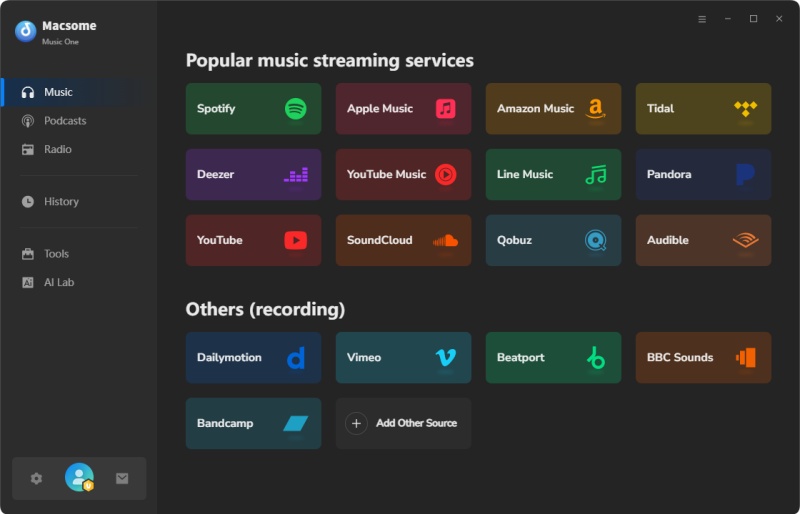
Step 2. Choose MP3 as the output format, output path, output quality, output file name, or other parameters, click on the "More settings" option.
Step 3. Go to YouTube, browse the videos, then press the "Click to add" button to load them to Macsome. Click the "Add" to import to the main window.
Step 4. Click on the "Convert" button to start downloading the YouTube to MP3 process. After the download, go to the "History" section on the left, and click the "Folder" icon to find the downloaded tracks.
Pros: Comprehensive features, high-quality output, reliable for offline use.
Cons: Free trial limitations; full version requires purchase.
FAQs about YouTube to MP3 Sites
Are free YouTube to MP3 sites legal?
Short answer: It depends on the content and your location. Downloading non-copyrighted or Creative Commons videos for personal use is generally acceptable, while converting copyrighted music without permission may violate local laws or YouTube’s terms of service.
Are free YouTube to MP3 sites safe?
In general: Some are safe, but many rely on aggressive ads. The safest free YouTube to MP3 sites do not require software installation, use HTTPS, and clearly label download buttons. Using an ad blocker and a modern browser significantly reduces risk.
What is the best free YouTube to MP3 site?
There is no single best option for everyone. Most free YouTube to MP3 sites work well for single videos but limit audio quality and features. The best choice depends on whether you prioritize speed, fewer ads, or higher bitrate MP3 files.
What audio quality do free YouTube to MP3 sites offer?
Most free converters offer 128 kbps to 320 kbps MP3. However, actual quality depends on the source video. Many sites advertise 320 kbps but deliver lower bitrates due to re-encoding.
Why do free YouTube to MP3 sites stop working?
Free YouTube to MP3 sites frequently go offline due to technical changes, legal pressure, or high server costs. This is why availability and performance can change without notice.
Legal and Copyright Considerations
When using free YouTube to MP3 sites, it’s important to be aware of copyright regulations. In many regions, downloading copyrighted material without permission may violate local laws or platform terms.
Content that is copyright-free, licensed under Creative Commons, or uploaded by the content owner is generally safer to convert. Always check your local regulations and use these tools responsibly.
Conclusion: Are Free YouTube to MP3 Sites Worth Using?
Free YouTube to MP3 sites remain a convenient option for quick, occasional audio conversions. They are easy to access, require no installation, and can be useful when you only need a single MP3 file.
That said, they also come with limitations such as ads, quality restrictions, and unreliable uptime. If you frequently download audio or care about consistent quality and safety, exploring more stable alternatives may be worthwhile. Ultimately, the best choice depends on how often you convert YouTube videos and what level of quality and reliability you expect.

Ethan Cole | Senior Editor

