

In 2026, streaming music has never been easier, but "owning" your music is more complex than ever. Whether you're a daily commuter or an international traveler, offline playback is essential. However, Amazon Music isn't a "free-for-all" storage locker. Licensing laws and tiered subscriptions mean that your ability to listen offline is governed by a strict set of rules that have been further refined this year.
This 2026 updated guide cuts through the jargon to explain exactly what you can and cannot do with your offline library.
Quick Navigation
Does Amazon Music Have Download Limits in 2026?
The short answer is yes. While Amazon often uses the word "Unlimited," that refers to the streaming catalog, not your download behavior. In 2026, Amazon utilizes a dynamic DRM system that monitors your subscription status and device usage in real-time.
Limits are categorized into three barriers: Quantity (how many songs), Hardware (how many phones/PCs), and Validation (how long you can stay offline). If you violate any of these, your "offline" library will immediately become inaccessible, often without a detailed error message.
Amazon Music Plans Explained (Free vs Prime vs Unlimited)
In 2026, the gap between tiers has widened significantly regarding offline capabilities:
Amazon Music Free
The Free tier is now exclusively ad-supported and cloud-based. You cannot download any music for offline use. If you lose your Wi-Fi or 5G connection, the music stops.
Amazon Music Prime
Prime members can now download All-Access Playlists. These are curated lists tailored to your tastes. However, the catch is that you cannot pick specific individual albums or "one-off" tracks to download unless they are part of these playlists. It's an "all-or-nothing" approach for Prime users.
Amazon Music Unlimited
This tier removes all "selection" limits. You can download any of the 100+ million songs, including the massive Ultra HD and Spatial Audio library. This is the only tier that offers a true "offline mirroring" of your cloud library.
💡 Tired of Tier Restrictions?
Don't let your subscription type dictate your listening habits. With TuneBoto Amazon Music Downloader, you can download any track from Prime or Unlimited as a permanent local file. No "All-Access" restrictions, no ads, just your music on your terms.
Try TuneBoto for freeHow Many Songs Can You Download on Amazon Music?
Amazon Music Unlimited does not officially state a numerical "cap" (unlike the old 10,000-song limits of the past). Instead, your limit is determined by your available device storage and app cache stability.
- Standard Quality: Approx. 9MB per song. You could fit ~11,000 songs on 100GB.
- Ultra HD Quality: Approx. 70MB per song. You could only fit ~1,400 songs on that same 100GB.
Warning: Users have reported that having more than 40,000 songs downloaded can cause the Amazon Music app to lag significantly, especially on older hardware with slower read/write speeds.
Amazon Music Device Download Limits
In 2026, you are permitted to authorize up to 10 devices per account for offline content. This includes smartphones, tablets, and the desktop app.
However, it’s important to distinguish between authorization and simultaneous streaming. While 10 devices can hold downloads, an Individual Plan only allows 1 device to be streaming at any given time. If you hit the 10-device limit, you must manually go to "Amazon Music Settings" -> "Manage Your Devices" to revoke access for old hardware before a new phone can download a single track.
Do Amazon Music Downloads Expire?
They don't "expire" in the sense of a milk carton, but they do invalidate. Amazon requires an "Internet Handshake" every 30 days. If your device hasn't pinged Amazon's servers in a month, the app will "lock" your downloads. This is to ensure you haven't canceled your subscription while keeping the music.
Furthermore, if a specific artist or label pulls their music from Amazon's platform due to a licensing dispute, those tracks will automatically disappear from your offline library the next time your device goes online.
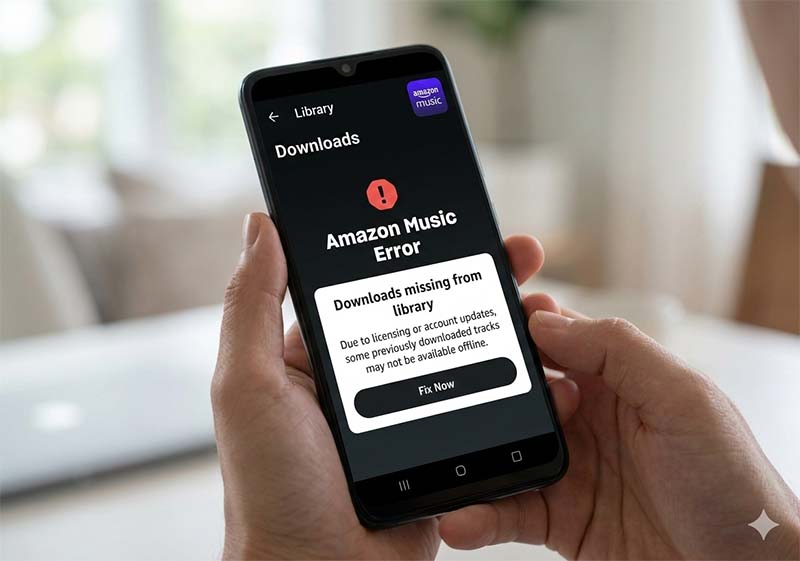
Why Did My Amazon Music Downloads Disappear?
This is the #1 complaint from users. Usually, it's not a bug, but a triggered rule:
- Subscription Lapse: Even a 1-day delay in renewing your Prime or Unlimited membership will trigger a global delete of offline cache on some devices.
- App Reinstall/Logout: Logging out of the app for security reasons also wipes the local encrypted files.
- Operating System Updates: Major Android or iOS updates sometimes clear "temporary" app data, which unfortunately includes your high-res music files.
- SD Card Issues: If you use an SD card and it becomes unmounted or corrupted, the app will act as if the library was never there.
Amazon Music Download Rules You Must Know (2026)
To stay compliant and avoid losing your music, keep these 2026 rules in mind:
- DRM Encryption: Every download is a .m4a or .flac file wrapped in Amazon's proprietary encryption. You cannot open these files in VLC, iTunes, or Windows Media Player.
- No External Storage Sharing: While you can save to an SD card, that card will only work on the specific device that did the downloading. You cannot put that SD card into a car stereo or another phone.
- Geographic Locks: If you travel to a country where Amazon Music isn't supported, your downloads may become inaccessible after a certain period due to region-locking protocols.
Pros & Cons of Amazon Music Downloads
Pros 👍
- Massive Selection: Access to 100M+ songs on Unlimited.
- Spatial Audio: Dolby Atmos and 360 Reality Audio available for offline use.
- 10-Device Limit: Very generous compared to other platforms.
Cons 👎
- Prime Limitations: No "pick-and-choose" downloads for Prime.
- Proprietary Files: Stuck inside the Amazon ecosystem.
- Battery Drain: Decoding high-res Ultra HD files offline consumes more battery than standard MP3s.
Amazon Music Download Limits Table (2026)
| Plan | Offline Capability | Device Limit | Max Quality |
|---|---|---|---|
| Free | ❌ None | N/A | Standard |
| Prime | ✅ All-Access Playlists | 10 Devices | Standard |
| Unlimited | ✅ Full Catalog | 10 Devices | Ultra HD / Spatial |
How to Manage & Maximize Amazon Music Downloads
To get the best experience, follow these "Pro" tips:
- Auto-Download: Enable "Auto-Download" for your Liked Songs to ensure your favorites are always ready.
- Cache Management: Set a "Download Limit" in settings (e.g., 20GB) to prevent the app from eating all your phone's storage.
- The Ultimate Solution: If you want to avoid all these rules, use TuneBoto. It records the audio stream into a standard format (MP3, AAC, FLAC), effectively "stripping" the DRM. This allows you to keep the music on a USB drive, a classic iPod, or your car's local storage forever.
Amazon Music Converter
-
TuneBoto for Personal Backup 100% clean and safe from malware.

-
Retains ultra-HD audio quality
-
Keep ID3 tags and lyrics; 100% original audio quality up to Ultra HD & HD
-
10X download speed & batch download playlists/albums
-
Archive downloaded songs by album/artist/playlist
-
Handy tools: Format Converter, Tag Edit, Burn CD and Export to iTunes/Music

Amazon Music Download Limits vs Spotify & Apple Music
Compared to its rivals in 2026:
- Spotify: Limits you to 10,000 songs per device and only 5 devices. Amazon’s 10-device limit is far better for power users.
- Apple Music: Allows up to 100,000 songs in your library, but its "Family Sharing" device management is often more restrictive than Amazon's simple authorization system.
FAQs About Amazon Music Download Limits
Q: Can I download music to my Apple Watch?
A: Yes, the Amazon Music Apple Watch app supports offline playback, but it counts as one of your 10 authorized devices.
Q: Will my downloads work if I cancel my subscription?
A: No. Once your billing cycle ends, the DRM keys are revoked and the files become unplayable.
Conclusion
While Amazon Music provides a convenient offline listening experience, its download rules in 2026 remain heavily governed by subscription tiers, device limits, and mandatory 30-day DRM validation handshakes. Official downloads function more like a "rental" service—once your subscription lapses or your device stays offline too long, your library becomes inaccessible.
If you want to bypass these barriers and achieve true offline freedom, TuneBoto Amazon Music Downloader is the ultimate solution. By converting encrypted streams into permanent local files like MP3 or FLAC, you can keep your favorite music forever on any device, completely free from official download restrictions.

Gabrielle Miller | Senior Editor

