

Are you tired of audio ads interrupting your favorite playlists, but not quite ready to commit to a costly Premium subscription? You aren't alone. In 2026, thousands of iOS users are actively searching for a reliable Spotify IPA (often known as Spotify++) to unlock highly sought-after features like unlimited skips, ad-blocking, and background playback without needing to jailbreak their iPhones.
However, the reality of iOS sideloading is often frustrating. If you've ever dealt with 7-day certificate revokes, sudden app crashes during your morning commute, or confusing developer mode settings, you know that keeping a modded IPA running requires constant maintenance.
This comprehensive, step-by-step guide is designed to cut through the noise. Below, we will walk you through the exact methods to safely download and install a Spotify IPA using industry-standard tools like AltStore and Sideloadly. More importantly, we will introduce you to a permanent, 100% revoke-free alternative—Macsome Spotify Downloader—so you can finally stop fighting with Apple's developer certificates and just enjoy your music offline. Let's dive in.
Table of Contents
What is a Spotify IPA?
In the world of iOS, an IPA (iOS App Store Package) is the equivalent of an APK on Android. A Spotify IPA (often referred to as Spotify++) is a modified version of the official app. Users seek these files to unlock features such as unlimited skips, ad-blocking, and "very high" audio quality without a monthly subscription.
However, since these apps are not hosted on the official Apple App Store, they must be "sideloaded" using specialized tools and developer certificates.
How to Install Spotify IPA on iOS (2026 Comprehensive Guide)
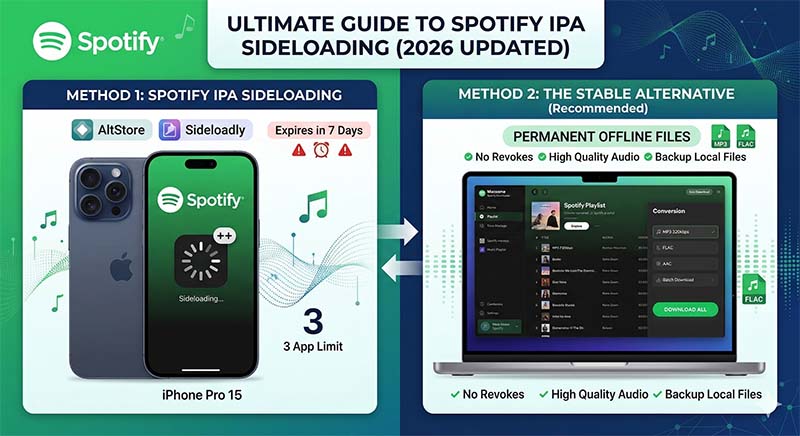
Installing a Spotify IPA requires bypassing the Apple App Store's "walled garden." Unlike Android's simple APK installation, iOS requires a "signature." Without a $99/year Apple Developer account, you must use third-party signing tools. Here are the two most reliable methods analyzed for stability and ease of use.
Method 1: The Sideloadly Power-User Guide
Sideloadly has overtaken many other tools in 2026 due to its "Wireless Sideloading" feature and its ability to handle "Apple ID Two-Factor Authentication" (2FA) seamlessly. It is the preferred choice for users who want a quick, desktop-to-iPhone transfer.
Prerequisites for Sideloadly:
- A Windows PC (7 or higher) or a macOS device.
- The latest version of iTunes (non-Microsoft Store version is recommended for better driver support).
- A valid Apple ID (we recommend using a "burner" account for extra privacy).
- A high-quality USB-to-Lightning or USB-C cable.
Step-by-Step Instructions:
- 1. Fetch the IPA: Download a verified Spotify IPA from a trusted repository. Ensure it is "decrypted" for compatibility.
- 2. Launch Sideloadly: Open the application on your PC. Connect your iPhone. You should see your device's UDID appear in the "Device" field.
- 3. Input Apple ID: Enter your email in the "Apple Account" field. Sideloadly uses this to request a free 7-day development certificate from Apple's servers.
- 4. Drag & Drop: Simply drag your
Spotify.ipafile into the large IPA icon on the left of the Sideloadly interface. - Advanced Options: Click "Advanced Options." Here, you can change the "App Name" or "Bundle ID" to allow you to have both the original Spotify and the Spotify IPA installed simultaneously.
- 5. Start: Click "Start." If prompted, enter your Apple ID password. Sideloadly will now upload the app, sign it, and install it on your home screen.
Method 2: The AltStore "No-Computer" Mobile Experience
While AltStore requires a computer for the initial setup, it allows you to manage your Spotify IPA directly from your iPhone afterward. This is the "Gold Standard" for long-term use.
Why AltStore is Different:
AltStore creates a local server on your network (AltServer). As long as your iPhone and computer are on the same Wi-Fi, AltStore will automatically refresh your Spotify IPA in the background, preventing that dreaded "App No Longer Available" crash every 7 days.
The Sideloading Headache: Revokes, Refreshes, and Bans
While a Spotify IPA sounds like a dream, the reality of sideloading is often a technical nightmare. If you use a free Apple Developer account, your app will expire every 7 days. This means you must reconnect to your computer weekly to "refresh" the certificate, or the app will crash.
- Revokes: Enterprise certificates are often banned by Apple within 24 hours.
- Security: Modded IPAs can contain hidden scripts that compromise your login data.
- Stability: Updates to iOS often break IPA compatibility instantly.
A Permanent Solution: Macsome Spotify Downloader
Let’s be honest: Sideloading is a game of cat and mouse. Even with the best Spotify IPA, you will eventually face a "Revoke" where Apple cancels the certificate, or you'll forget to refresh it on the 7th day, leaving you without music during your commute.
This is where Macsome Spotify Downloader changes the game. Instead of fighting against iOS restrictions, Macsome allows you to take control of the source files.
Spotify Music Converter
-
Download Spotify songs, playlists, audiobooks, and podcasts with high quality.

-
Convert Spotify songs to MP3, AAC, WAV, FLAC, AIFF, or ALAC.
-
Download music from both the Spotify app and the Spotify web player.
-
One-click to burn CDs & Import Spotify songs to Amazon Music / Apple Music.
-
Free upgrade and technical support
Why Choose Macsome Over a Modded IPA?
| Feature | Spotify IPA (Sideloaded) | Macsome Spotify Downloader |
|---|---|---|
| Ease of Use | Complex (Requires Sideloading) | Simple (One-click Conversion) |
| Stability | Expires every 7 days | Permanent Files |
| Audio Quality | Variable | Lossless (up to 320kbps) |
| Device Support | iOS only | Any device (iPhone, Android, MP3 Player) |
How Macsome Simplifies Your Life:
- No More 7-Day Limit: Since Macsome converts Spotify songs into standard MP3 files, they never "expire." You own the files forever.
- No Jailbreak/Sideloading Required: You don't need to risk your Apple ID or deal with buggy IPA files. Just download the music on your Mac/PC and sync it via iTunes or Finder.
- Retain Metadata: Unlike "screen recorders," Macsome preserves all ID3 tags, including artist names, album art, and track numbers. Your library looks exactly like it does in the Spotify app.
- Batch Conversion: Have a playlist with 500 songs? A Spotify IPA won't help you download them for offline use without a Premium sub. Macsome will download the entire list at 10x speed.
The Strategic Workflow: Most pro users install a Spotify IPA for casual browsing but use Macsome to build a permanent offline library. This ensures that even if your IPA crashes, your music collection remains accessible in the native iOS Music app or any third-party player like VLC.
Advanced Troubleshooting: Solving Spotify IPA Crashes
If your Spotify IPA is failing, check these common 2026 iOS conflicts:
1. Developer Mode (iOS 16+)
Apple now requires a manual toggle to run sideloaded apps. If your IPA won't open, go to Settings > Privacy & Security > Developer Mode and toggle it ON. Your phone will reboot to apply this change.
2. The "3 App Limit"
Standard Apple IDs are limited to three active sideloaded apps. If you have AltStore and two other IPAs, you must delete one before installing a new Spotify IPA. Macsome users avoid this entirely as there is no limit to how many songs you can sync.
3. "Application is Missing Application-Identifier"
This usually means the IPA file is corrupted or improperly "cracked." In this case, you must find a different source for your Spotify IPA or switch to a stable downloader like Macsome.
Frequently Asked Questions
Q: Can I get Spotify Premium for free with an IPA?
A: It unlocks UI features like skips and ad-blocking, but it does not allow for server-side "Offline Downloads" within the app. For true offline downloads, use Macsome.
Q: Will my Spotify account get banned?
A: There is always a risk when using modified clients. Using a downloader like Macsome is significantly safer as it doesn't modify the Spotify app code on your mobile device.
Conclusion: Is a Spotify IPA Worth the Hassle in 2026?
Sideloading a Spotify IPA remains a viable workaround for iOS users looking to unlock premium features without a subscription or a jailbroken device. As we've covered, tools like AltStore and Sideloadly have streamlined the installation process significantly. However, the reality is that the constant battle against Apple's 7-day certificate revokes, the restrictive 3-app limit, and the potential security risks make it a tedious experience for daily use.
If you are tired of your music app suddenly crashing on your commute or spending your weekends reconnecting your iPhone to your PC just to refresh a developer certificate, it is time to pivot your strategy.


Ethan Cole | Senior Editor

