

Downloading FLAC lossless music is the best choice for listeners who care about original sound quality. Unlike MP3 or AAC, FLAC (Free Lossless Audio Codec) preserves 100% of the original audio data while reducing file size efficiently, making it the preferred format for audiophiles, DJs, and high-end music collections.
In this guide, you’ll learn how to download FLAC lossless music safely and efficiently in 2026, including official sources, third-party tools, and practical tips for keeping studio-quality sound. Whether you want to download FLAC albums for offline listening, archive your music library, or compare FLAC vs MP3 quality, this page covers all the reliable options available today.
We’ll also explain what makes FLAC truly lossless, when FLAC is worth using over other formats, and how to avoid fake “upscaled” FLAC files that don’t deliver real lossless quality. If you’re looking for a trusted way to download high-quality FLAC music on Windows or Mac, this guide will help you choose the right solution based on sound quality, compatibility, and ease of use.
In this guide, you’ll discover:
- What FLAC lossless music really means (and how to verify it)
- Legal and safe ways to download FLAC music
- FLAC vs MP3 vs WAV: real-world quality comparison
- The best FLAC music downloaders for offline listening
Table of Contents
- Desktop Software to Download FLAC Lossless Music (Recommended)
- 1. TuneBoto Amazon Music to FLAC Downloader
- 2. Music One All-In-One FLAC Downloader
- 3. NoteBurner Music Converter
- 4. Sidify Music Converter
- 5. AudFree Audio Capture
- Mobile Apps to Download FLAC Lossless Music
- 1. Fildo (Android)
- 2. NewPipe with External Sources
- 3. Open-source Music Downloader Apps
- 4. iOS Files and Cloud-Based Access
- Online Websites to Download FLAC Lossless Music
- 1. Internet Archive
- 2. Free Music Archive
- 3. Jamendo
- 4. Bandcamp
- 5. Qobuz Download Store
- 6. HDtracks
- Recording-Based Methods (Not Recommended)
- FLAC vs MP3: Audio Quality & Use Cases
- FAQs about Downloading FLAC Lossless Music
- Conclusion
Desktop Software to Download FLAC Lossless Music (Recommended)
1. TuneBoto Amazon Music Downloader
TuneBoto Amazon Music Downloader is a professional desktop solution designed specifically for users who want to download FLAC lossless music from Amazon Music. It supports albums, playlists, podcasts, and individual tracks while preserving the original audio quality, sample rate, and bit depth. Unlike basic recording tools, TuneBoto performs direct conversion, ensuring stable output and accurate metadata such as artist name, album title, track number, and cover art. This makes it ideal for building a long-term, well-organized FLAC music library.
Why choose TuneBoto? If Amazon Music is your primary platform, TuneBoto offers one of the most efficient ways to build a permanent FLAC library for offline listening on any device.
Learn more about TuneBoto Amazon Music Downloader →
Amazon Music Converter
-
Download Amazon Music songs, albums, playlists & podcasts to local computer

-
Convert Amazon Music songs to FLAC, MP3, AAC, WAV, AIFF, ALAC
-
Keep ID3 tags and lyrics; 100% original audio quality up to Ultra HD & HD
-
10X download speed & batch download playlists/albums
-
Archive downloaded songs by album/artist/playlist
-
Handy tools: Format Converter, Tag Edit, Burn CD and Export to iTunes/Music

How to download Amazon Music to FLAC losslessly
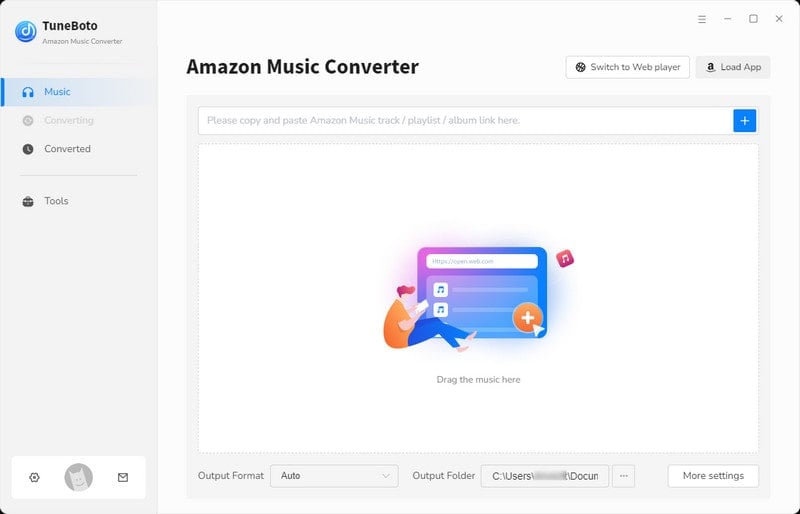
Step 1 Run TuneBoto and Choose One Mode You Like
Open TuneBoto on your computer and then you will see a page below. Amazon Music Web player mode can extract songs from the Amazon Music player and download them at 10x the speed, which is up to HD. Amazon Music App mode downloads songs by extracting them from the Amazon Music official app at 5x the speed, with the highest sound quality up to Ultra HD.
Step 2 Select FLAC as Output Format
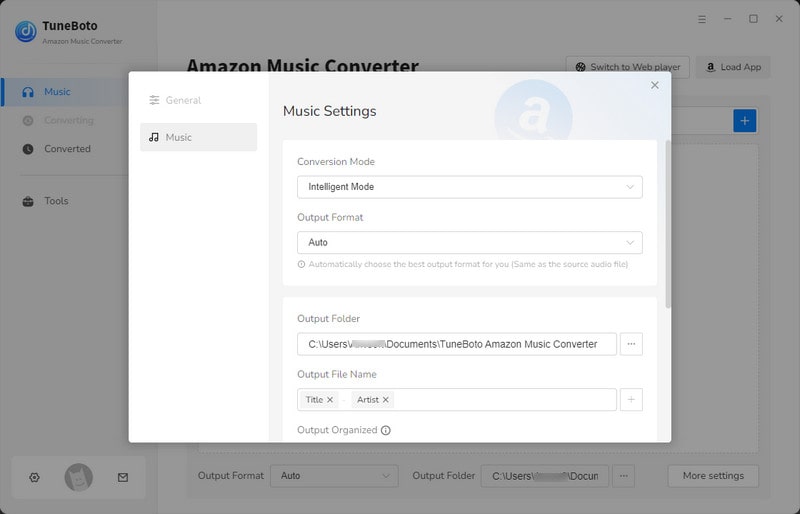
You can adjust the output settings as needed on the Settings tab in the lower left corner, including output file name, output sound quality, output folder, output format, etc. Go to Settings, choose FLAC as the output format, and customize options like bitrate (up to 320kbps) or sample rate (up to 192kHz). Select an output folder for easy access.
Step 3 Add Songs or Playlists
Browse Amazon Music within TuneBoto, select your desired songs, albums, or playlists, and add them to the conversion queue. TuneBoto gives users both Web Player and App modes.
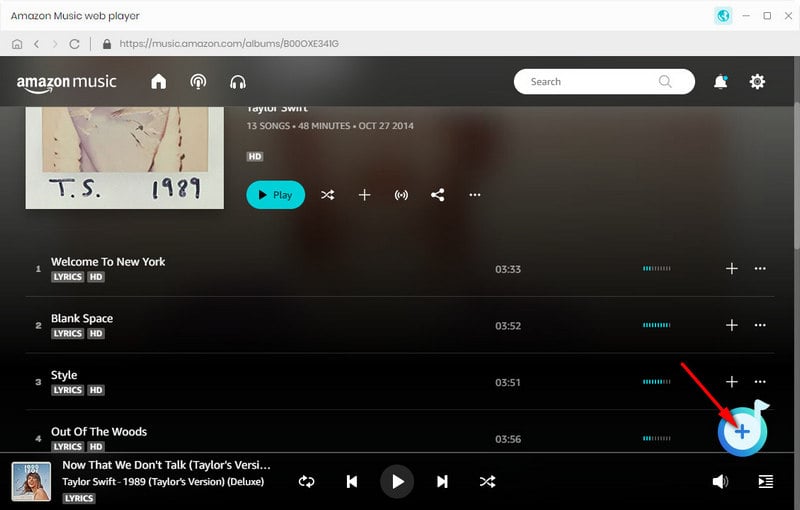
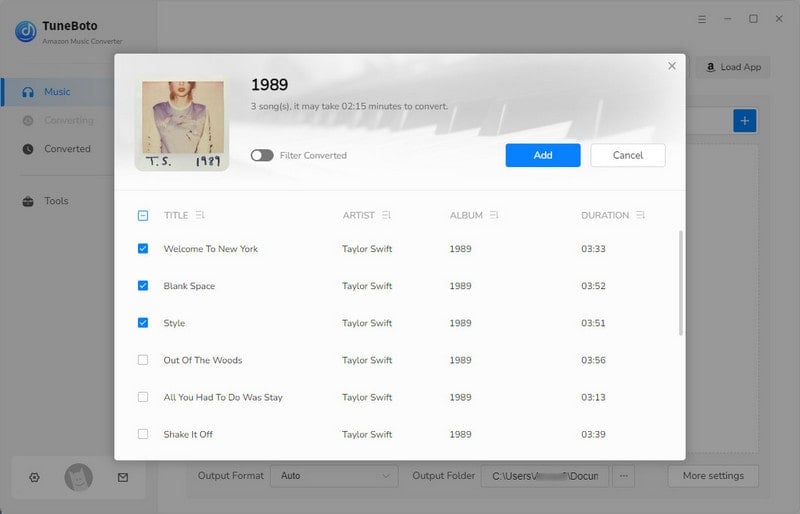
For Amazon Music Web player: In the Amazon Music web player, open the playlist you want and select Click to add. Choose the required songs in the pop-up window and click Add to add them to the download list.
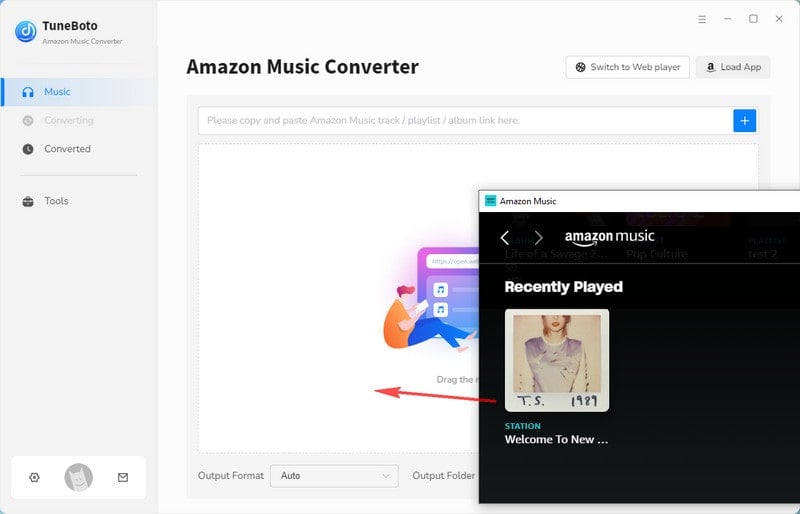
For Amazon Music App: In the Amazon Music app, drag the playlist you want to download to TuneBoto's homepage or copy the URL to the parsing box, then select the song and tap on the Add button.
Step 4 Start to Download Amazon Music
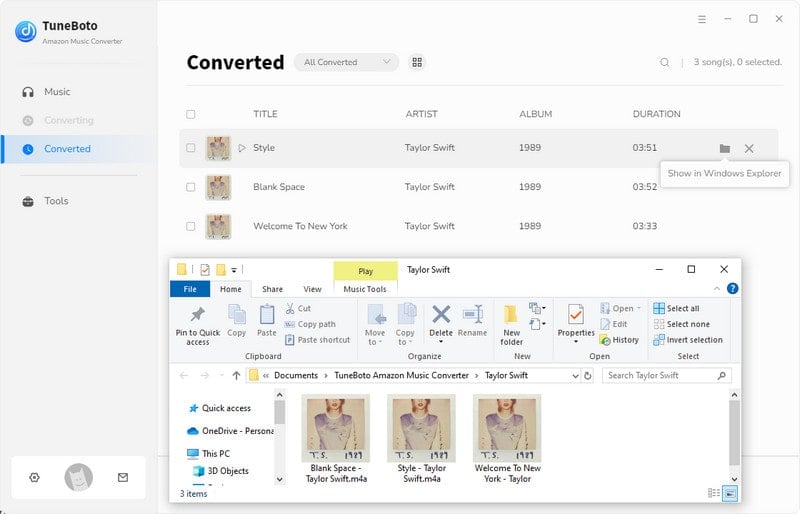
Click "Convert" to start downloading. TuneBoto supports up to 10x conversion speed for quick results. Once done, find your FLAC files in the designated output folder, ready for transfer to any device.
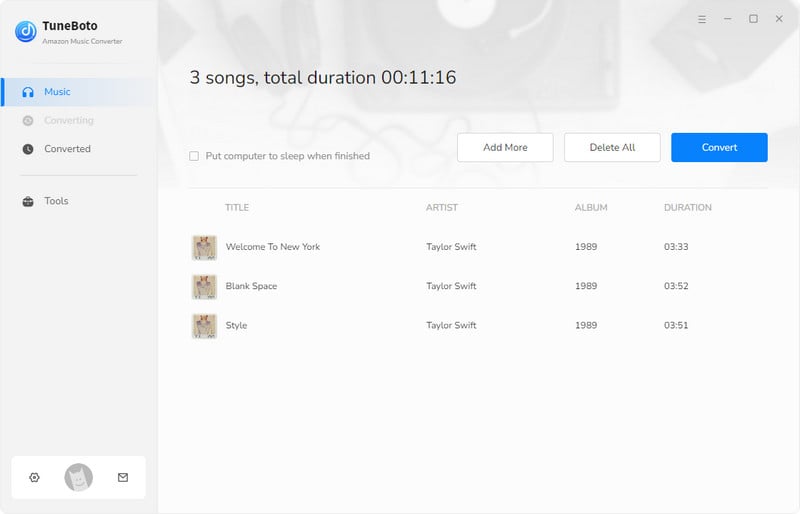
After a few minutes, you can find out the downloaded Amazon Music tracks by clicking the "Converted" section.
2. Macsome Music One
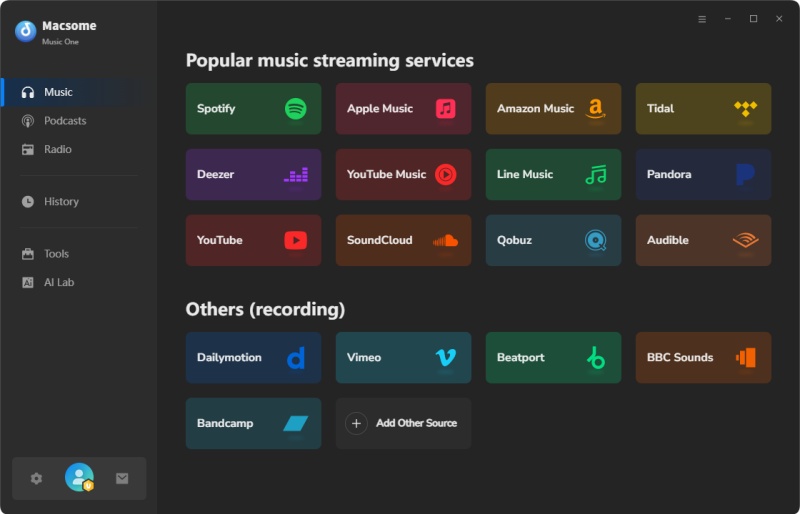
Macsome Music One is an all-in-one music downloader that supports multiple streaming platforms, making it suitable for users who rely on more than one service. It allows you to download FLAC lossless music while maintaining the original audio structure and tags. With a clean interface and batch processing support, Macsome Music One is often chosen by advanced users who want flexibility, consistent quality, and compatibility with different music ecosystems in a single program.
Visit Macsome Music One official site →
| Category | Details |
|---|---|
| Type | Multi-platform desktop downloader |
| Platforms | Amazon Music, Spotify, Tidal, Apple Music, etc. |
| Quality | Lossless FLAC (with original bitrate) |
| Download Format | FLAC, WAV, AIFF, ALAC |
| Pricing | Paid |
| Best For | Users with multiple music services |
| Pros | Convenient if you subscribe to multiple streaming services. FLAC output quality is reliable across platforms, and format options are flexible. |
| Cons | Because it supports many services, downloads—especially from Amazon Music—can feel slightly slower and less optimized. |
3. NoteBurner Music Converter
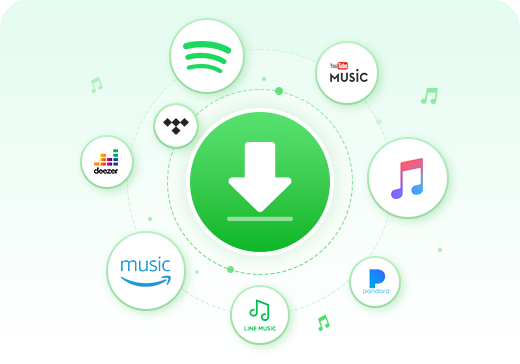
NoteBurner Music Converter focuses on converting streamed music into local files, including FLAC format. It emphasizes speed, stability, and metadata accuracy, making it a practical option for users who want to archive playlists or albums for offline use. While it may not support as many platforms as all-in-one tools, it provides reliable FLAC output suitable for high-quality playback on home audio systems and portable players.
| Category | Details |
|---|---|
| Type | Desktop music converter |
| Platforms | Spotify, Amazon Music, Apple Music |
| Quality | FLAC lossless |
| Pricing | Paid |
| Pros | Fast, stable, preserves metadata |
| Cons | Limited to supported platforms |
4. Sidify Music Converter
Sidify Music Converter is another desktop-based option that supports FLAC and WAV output. It is designed for users who value simplicity and consistent performance. Sidify preserves essential ID3 tags and supports batch downloads, making it efficient for large music collections. Although its feature set is relatively focused, it remains a solid choice for users who want dependable FLAC downloads without unnecessary complexity.
| Category | Details |
|---|---|
| Type | Desktop FLAC converter |
| Platforms | Spotify, Amazon Music, Tidal |
| Quality | FLAC / WAV |
| Pricing | Paid |
| Pros | Simple, reliable, maintains metadata |
| Cons | Limited features for batch conversion |

5. AudFree Audio Capture
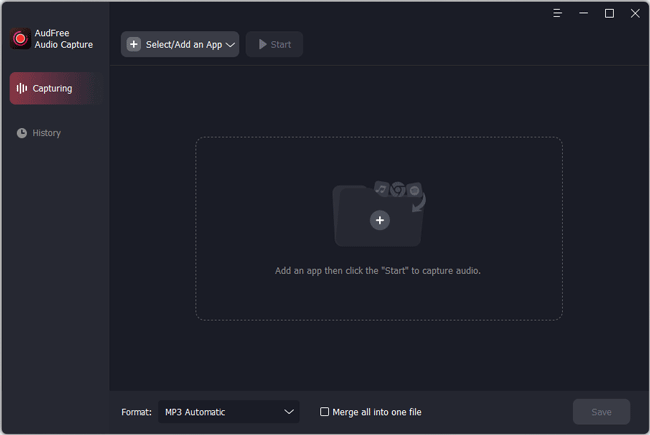
AudFree Audio Capture records system audio and saves it as FLAC or WAV files. This method offers flexibility, as it can capture sound from almost any application. However, because it relies on real-time recording, it is less efficient than direct downloaders and depends heavily on system audio settings. It is better suited for advanced users who understand audio routing and accept longer recording times.
| Category | Details |
|---|---|
| Type | Audio recording software |
| Platforms | Windows, Mac |
| Quality | FLAC (may vary due to recording) |
| Pricing | Paid |
| Pros | Flexible, can capture any audio |
| Cons | Not true direct FLAC, slower |
Mobile Apps to Download FLAC Lossless Music
6. Fildo (Android)
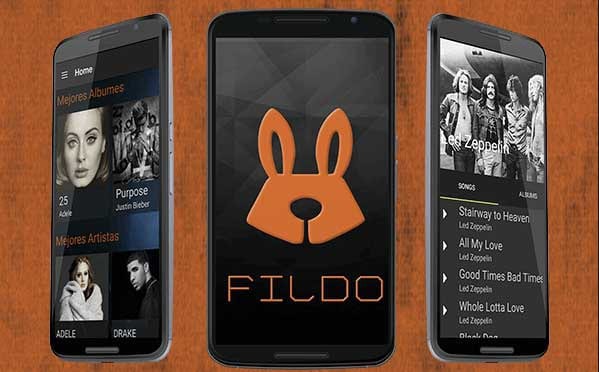
Fildo is an Android app that indexes third-party music sources and sometimes provides access to FLAC files. While it is free and convenient, availability and legality depend entirely on the sources it references. Audio quality and metadata consistency vary, making it less reliable for users who want guaranteed lossless downloads. It is generally recommended only for casual exploration rather than serious FLAC collection building.
| Category | Details |
|---|---|
| Type | Mobile Android app |
| Platforms | Android |
| Quality | FLAC (varies) |
| Pricing | Free |
| Best For | Android users seeking occasional FLAC |
| Pros | Free, mobile convenience |
| Cons | Limited reliability and legality |
7. NewPipe with External Sources
NewPipe is an open-source Android application primarily designed for streaming. Some advanced users combine it with external libraries or sources to obtain higher-quality audio. However, true FLAC lossless music is not consistently available, and the process requires technical knowledge. This method is best suited for experimental users rather than those seeking a straightforward FLAC download solution.
| Category | Details |
|---|---|
| Type | Open-source Android app |
| Platforms | Android |
| Quality | FLAC occasionally |
| Pricing | Free |
| Best For | Advanced users seeking open-source solutions |
| Pros | Free, open-source |
| Cons | Inconsistent downloads |
8. Open-source Music Downloader Apps
Various open-source Android apps claim to support FLAC downloads, but results vary significantly. Audio authenticity, source reliability, and metadata quality are inconsistent. While these apps appeal to users who prefer free and open tools, they rarely match the stability, legality, or quality assurance provided by professional desktop software or official music stores.
| Category | Details |
|---|---|
| Type | Open-source apps |
| Platforms | Android / iOS |
| Quality | FLAC occasionally |
| Pricing | Free |
| Best For | Users experimenting with open-source tools |
| Pros | Free, community-supported |
| Cons | Variable quality, reliability issues |
9. iOS Files and Cloud-Based Access
Due to system restrictions, iOS does not allow direct FLAC downloads from most sources. Users typically rely on cloud storage services to access legally purchased FLAC files. This method works well for playback but does not provide a native downloading experience. It is best viewed as a workaround rather than a primary solution.
| Category | Details |
|---|---|
| Type | Cloud-based access / iOS Files |
| Platforms | iOS |
| Quality | FLAC (depends on uploaded files) |
| Pricing | Varies |
| Best For | iOS users with cloud storage |
| Pros | Legal, integrated into iOS |
| Cons | Cannot download new FLAC directly |
Online Websites to Download FLAC Lossless Music
10. Internet Archive
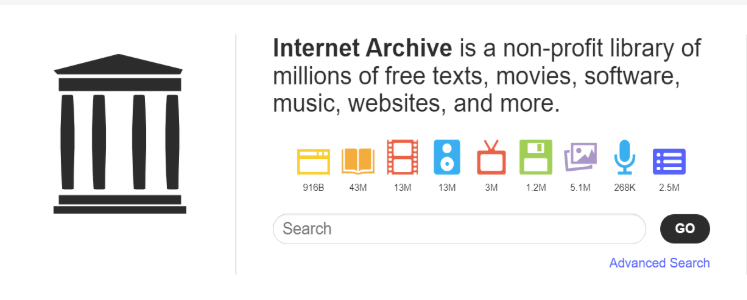
Internet Archive offers a large collection of FLAC files that are legally available, including public-domain recordings and live concerts. While it is an excellent free resource, the catalog focuses on niche and historical content rather than mainstream releases. Audio quality varies depending on the original source, but it remains a trustworthy option for legal FLAC downloads.
| Category | Details |
|---|---|
| Type | Online archive |
| Platforms | Web |
| Quality | FLAC (varies) |
| Pricing | Free |
| Best For | Historical & public domain recordings |
| Pros | Legal, free |
| Cons | Quality inconsistent |
11. Free Music Archive
Free Music Archive provides music released under Creative Commons licenses, with some tracks available in FLAC format. It is suitable for discovering independent artists and royalty-free music. However, FLAC availability is limited, and mainstream content is rare. It works best as a supplementary source rather than a primary FLAC provider.
| Category | Details |
|---|---|
| Type | Creative Commons music site |
| Platforms | Web |
| Quality | FLAC occasionally |
| Pricing | Free |
| Best For | Independent & CC music |
| Pros | Legal, free |
| Cons | Limited selection |
12. Jamendo
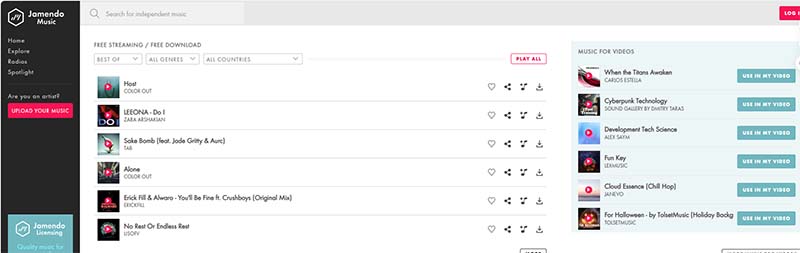
Jamendo focuses on independent musicians and offers both free and paid music downloads. Some artists provide FLAC files, though availability is limited. Jamendo is ideal for users looking to explore new music while respecting licensing terms, but it is not designed for comprehensive FLAC collections.
| Category | Details |
|---|---|
| Type | Independent music platform |
| Platforms | Web |
| Quality | FLAC occasionally |
| Pricing | Free / paid options |
| Best For | Indie music fans |
| Pros | Legal, supports artists |
| Cons | Limited mainstream content |
13. Bandcamp
Bandcamp is one of the most trusted platforms to legally download FLAC lossless music. Artists sell their music directly, and buyers can choose FLAC or other formats after purchase. This ensures true lossless quality, complete metadata, and long-term access. Bandcamp is especially popular among indie and niche music fans.
| Category | Details |
|---|---|
| Type | Artist-direct online store |
| Platforms | Web |
| Quality | True FLAC lossless |
| Pricing | Paid per album/track |
| Best For | Supporting artists & ownership |
| Pros | Lossless, legal, artist-supported |
| Cons | Cost varies |
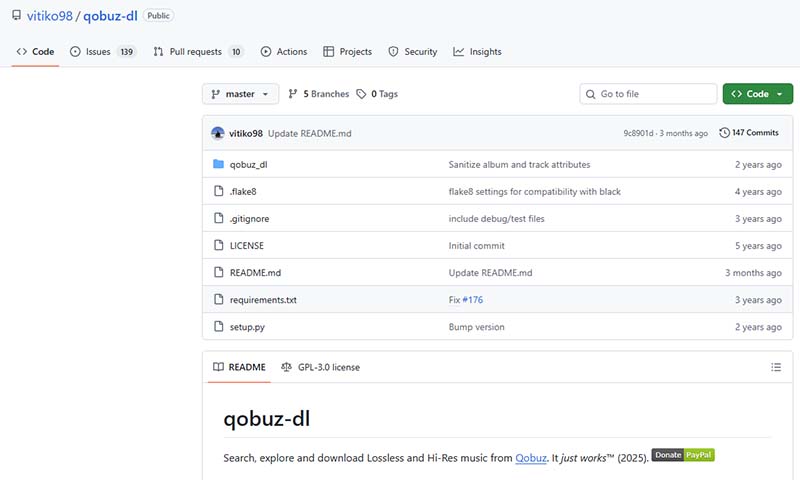
14. Qobuz Download Store
Qobuz offers high-quality FLAC downloads ranging from CD quality to high-resolution audio. Its catalog includes mainstream and niche genres, making it a favorite among audiophiles. Purchased files are DRM-free, allowing permanent offline access. Qobuz is ideal for users who want guaranteed quality and legal ownership.
| Category | Details |
|---|---|
| Type | High-resolution download store |
| Platforms | Web |
| Quality | CD-quality to Hi-Res FLAC |
| Pricing | Paid per album/track |
| Best For | Audiophiles seeking Hi-Res FLAC |
| Pros | High quality, DRM-free |
| Cons | Expensive |
15. HDtracks
HDtracks specializes in high-resolution FLAC music, often reaching 24-bit/192 kHz. It targets audiophiles seeking studio-master quality recordings. While prices are higher than standard stores, the audio quality and mastering standards justify the cost for serious listeners.
| Category | Details |
|---|---|
| Type | High-resolution music store |
| Platforms | Web |
| Quality | FLAC Hi-Res up to 24bit/192kHz |
| Pricing | Paid |
| Best For | Audiophiles & collectors |
| Pros | Studio-quality, legal |
| Cons | Costly |
Recording-Based Methods (Not Recommended)
16. System Audio Recording
System audio recording captures sound as it plays and saves it as FLAC. While technically possible, it rarely achieves true lossless quality due to resampling and hardware limitations. This method is generally not recommended unless no other option is available.
| Category | Details |
|---|---|
| Type | Recording software |
| Platforms | Windows / Mac |
| Quality | FLAC (depends on playback) |
| Pricing | Paid / free options |
| Best For | Capturing any audio |
| Pros | Flexible |
| Cons | Not truly lossless |
17. Virtual Sound Card Recording
Virtual sound card recording routes audio internally and records it into FLAC files. Although more controlled than basic recording, it still cannot guarantee bit-perfect lossless results. It is best suited for advanced users and experimental use cases.
| Category | Details |
|---|---|
| Type | Virtual sound card recording |
| Platforms | Windows / Mac |
| Quality | FLAC (depends on settings) |
| Pricing | Paid / free |
| Best For | Users needing advanced control |
| Pros | More accurate than basic recording |
| Cons | Not true direct FLAC |
FLAC vs MP3: Audio Quality & Use Cases
FLAC and MP3 are two of the most common audio formats, but they serve very different purposes. The table below compares FLAC lossless audio and MP3 lossy audio in terms of sound quality, file size, and real-world usage.
| Feature | FLAC (Lossless) | MP3 (Lossy) |
|---|---|---|
| Audio Quality | 100% lossless, identical to the original source | Lossy compression, audio data removed |
| Bitrate | Variable, typically 700–1400 kbps | Usually 128–320 kbps |
| Sound Detail | Full dynamic range and frequency spectrum | Reduced detail, especially in high frequencies |
| File Size | Larger than MP3 | Smaller and more storage-friendly |
| Best For | Audiophiles, DJs, archiving, high-end audio systems | Casual listening, mobile devices |
| Editing & Re-encoding | No quality loss when converting | Quality degrades after re-encoding |
| Device Compatibility | Widely supported on modern players | Universally supported |
Quick takeaway: Choose FLAC for maximum sound quality and long-term music storage. Choose MP3 if you prioritize smaller file sizes and universal compatibility.
FAQs about Downloading FLAC Lossless Music
What is the best way to download FLAC lossless music?
The best way to download FLAC lossless music is to use reliable desktop software or official music stores. Desktop programs like TuneBoto Amazon Music Downloader and Macsome Music One offer stable downloads, true lossless FLAC output, and full metadata retention. For direct purchases, platforms such as Bandcamp and Qobuz provide legal FLAC downloads.
Is it legal to download FLAC lossless music?
Yes, downloading FLAC lossless music is legal when the source is authorized. Legal sources include official music stores, artist websites, public‑domain libraries, or music you have purchased. Downloading FLAC files from unauthorized websites or ripping protected streaming content without permission may violate copyright laws.
Is FLAC better than MP3 for offline listening?
FLAC is better than MP3 for offline listening if sound quality matters. FLAC preserves 100% of the original audio data, while MP3 permanently removes parts of the sound to reduce file size. On high‑quality headphones or speakers, FLAC delivers clearer detail, wider dynamics, and more accurate sound.
Can I download FLAC lossless music from streaming services?
Most streaming services do not allow direct FLAC downloads. To save music offline as FLAC, users typically rely on desktop tools that convert streamed tracks into local FLAC files, such as TuneBoto Amazon Music Downloader. Always check local laws and platform terms before using such tools.
Are free FLAC download websites safe to use?
Some free FLAC download websites are safe and legal, such as Internet Archive or Free Music Archive, which offer public‑domain or Creative Commons music. However, many “free FLAC” sites host unauthorized content and may pose legal or security risks. Always verify the legitimacy of the source.
Conclusion
If you’re serious about sound quality, choosing the right method to download FLAC lossless music is essential. While apps and free websites may work occasionally, they often fall short in consistency and quality.
Desktop tools like TuneBoto Amazon Music Downloader and Macsome Music One provide the most dependable way to build a high‑quality offline music library. Combined with legal download stores such as Bandcamp and Qobuz, they ensure you get true lossless audio without compromise.
By selecting the method that best matches your needs, you can enjoy FLAC music the way it was meant to be heard — pure, detailed, and unrestricted.
Amazon Music Converter
-
Download Amazon Music songs, albums, playlists & podcasts to local computer
-
Convert Amazon Music songs to MP3, AAC, WAV, FLAC, AIFF, ALAC
-
Keep ID3 tags and lyrics; 100% original audio quality up to Ultra HD & HD
-
10X download speed & batch download playlists/albums
-
Archive downloaded songs by album/artist/playlist
-
Handy tools: Format Converter, Tag Edit, Burn CD and Export to iTunes/Music

Ethan Cole | Senior Editor

