Can You Download on Hulu? 3 Ways to Watch Offline
Learn what the official Hulu app allows, why desktop downloads are limited, and how to choose an option for offline viewing.
Can You Download Shows and Movies on Hulu?
Yes, you can download on Hulu, but only when your subscription, device, and selected title meet Hulu's requirements. Official downloads are intended mainly for supported mobile devices and come with limits on expiration, storage, and eligible content. They are not a general download feature for Windows PCs or Macs.
This guide explains how Hulu downloads work, what browser tools and screen recorders can and cannot do, and how desktop software such as TuneBoto Video One fits into the picture. It also compares the options and covers fixes for common download problems.

Method 1: Download Shows and Movies with the Official Hulu App
The official Hulu app is the most straightforward way to prepare eligible shows and movies for offline viewing. Once downloaded, supported titles can be watched in the app without an internet connection.
What You Need Before Downloading
- Eligible subscription: Official downloads generally require an eligible Hulu (No Ads) plan. Plan availability and terms may vary.
- Supported device: Downloads are intended for supported mobile devices, such as compatible iPhones, iPads, and Android devices. Amazon Fire support depends on the device and app version.
- Eligible title: Not every show or movie in Hulu's catalog is available for download.
- Available storage: Your device needs enough free space for the selected video.
- Updated app: Install the latest Hulu app version to avoid compatibility problems.
How to Download Hulu Videos on a Mobile Device
- Open the Hulu app on a supported mobile device and sign in.
- Find the movie or TV show you want to watch.
- Look for the Download icon or option on the title's details page.
- For a TV series, select the download option next to an eligible episode.
- Wait for the download to finish, then find it in the app's Downloads section.
- When offline, play the downloaded title from that section.
If you don't see a Download option, the title, subscription, or device may not be eligible.
Hulu Download Limits You Should Know
Hulu downloads are convenient, but they are not permanent, unrestricted video files.
| Limitation | What It Means |
|---|---|
| Subscription | An eligible No Ads plan is generally required. |
| Expiration | Downloads may expire after 30 days. |
| After playback starts | A downloaded title may expire 48 hours after you begin watching. |
| Download allowance | Hulu has commonly applied a limit of 25 downloads across up to 5 supported devices. |
| PC and Mac | The official download feature is not generally available for Windows or macOS computers. |
| Content availability | Licensing restrictions mean some titles cannot be downloaded. |
| File access | Downloads remain inside the Hulu app rather than appearing as ordinary MP4 or MKV files. |
Check your current plan and Hulu's Help Center for the latest terms, since limits and eligibility can change.
Pros and Cons of the Official Hulu App
Pros
- Official and straightforward.
- No separate video downloader required.
- Eligible titles can be watched without Wi-Fi.
- Downloads are managed inside the Hulu app.
Cons
- Requires an eligible subscription.
- Only selected titles can be downloaded.
- Downloads have expiration, storage, and device limits.
- Files are not exported as standard MP4 or MKV videos.
- Direct downloads to Windows PCs and Macs are generally unavailable.
Best for: Hulu subscribers who want a convenient way to watch eligible titles offline on a supported mobile device.
Method 2: Free Browser Extensions and Screen Recorders
Searches for ways to download Hulu on a PC or Mac may surface browser extensions, online download websites, and screen-recording programs. These tools are often advertised as free alternatives, but their capabilities are limited and they may not work with Hulu's protected video playback.
Browser Extensions and Online Downloaders
Some extensions and websites claim to detect video streams and save them to a computer. Their effectiveness depends on the website, browser, video delivery method, and content protection.
Potential advantages
- Some tools are free to install or use.
- Browser-based tools may not require a separate desktop app.
- They can be convenient for ordinary, unprotected web videos.
Potential disadvantages
- Many cannot process protected Hulu streams.
- Extensions may request broad browser permissions.
- Unfamiliar sites can contain deceptive ads, redirects, or malicious downloads.
- Output quality, formats, and reliability are inconsistent.
- Some services advertise features they cannot actually deliver.
Be cautious of any extension that asks for your Hulu password or promises access to private account content.
Screen Recorders
A screen recorder captures what appears on your display instead of downloading the original video file.
Potential advantages
- Basic screen-recording software may be free.
- It can capture ordinary desktop activity.
- You can record other content when recording is permitted.
Potential disadvantages
- Recording takes at least as long as the video itself.
- Protected playback may produce a black screen or muted audio.
- Audio and video can become out of sync.
- Notifications or other desktop activity may appear.
- Quality depends on the display, settings, and system performance.
Screen recording is not a dependable way to save Hulu titles, and it does not remove copyright or platform restrictions.
Are Free Hulu Downloaders Worth Trying?
For ordinary, unprotected videos, free browser tools can be useful. For Hulu's protected streaming catalog, however, they are often unreliable. Treat any tool claiming to download every Hulu title in one click with skepticism. Check Hulu's official viewing options first, and make sure any local-file method is authorized.
Method 3: TuneBoto Video One for Desktop Video Management
TuneBoto Video One is a Windows and Mac desktop video application designed to help users save supported online videos in common formats for local playback. Check the current supported website list and product documentation before relying on any specific service or feature.

Desktop workflow for supported videos
If you want to manage supported online videos on a computer, TuneBoto Video One offers a desktop workflow rather than relying on a mobile app's temporary offline storage.
Hulu compatibility is not guaranteed. Do not assume every Hulu title or URL can be processed. Compatibility depends on the current supported website list, software version, content restrictions, and your permissions.
 Download for Windows
 Download for Mac
Visit TuneBoto Video One to review the product information and current support list.
Key Features
For websites and content supported by the software, TuneBoto Video One is designed to offer:
- Common video formats: Save supported videos in MP4 or MKV where available.
- High-resolution output: Resolution options depend on the source and supported service.
- Audio and subtitles: Available language tracks and subtitle options depend on the source.
- Batch processing: Add multiple supported videos to a download queue.
- Local playback: Manage downloaded files with compatible media players.
- Windows and Mac support: Use a desktop workflow on supported computer systems.
A local video file does not follow an app's ordinary offline-download countdown. However, that does not mean every streaming title can be saved permanently or that platform licensing restrictions disappear.
How to Use TuneBoto Video One
For a website and video in TuneBoto's current supported list, and where you have permission to save the content:
- Install and open the software. Choose the Windows or Mac version from the official website.
- Select a supported website. Check the current list; do not assume Hulu is supported if it is not listed.
- Add the video. Use the software's supported browsing or URL workflow for the eligible video.
- Choose output settings. Select an available format, resolution, and audio or subtitle options, then start processing.
How to Use TuneBoto Video One
Download Videos from Hulu – Step by Step Guide
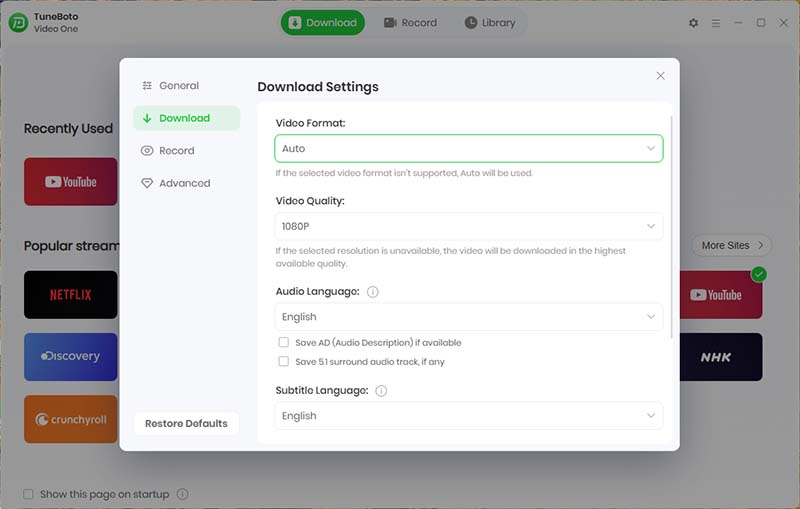
General Settings
Open TuneBoto Video One and click the gear icon. Go to the Download interface to configure the general settings. These settings will apply to all platforms by default.
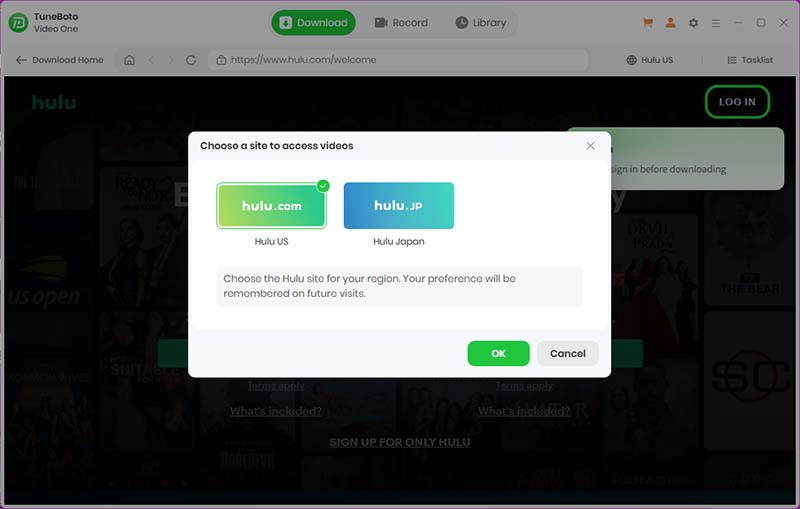
Select Hulu Platform & Log In
Choose the Hulu platform and open it. Select either Hulu.com or Hulu.jp, then log in to your account.
Browse or Search for Videos
Browse the catalog or use the search function to find the videos you want to download.

You can open the details page or preview the video. Click Detect Video, and TuneBoto will automatically recognize and load the video into the download list.

Select Episodes & Adjust Settings
Select the episodes you want to download. If needed, click on the quality, output format, or other options to customize the settings.
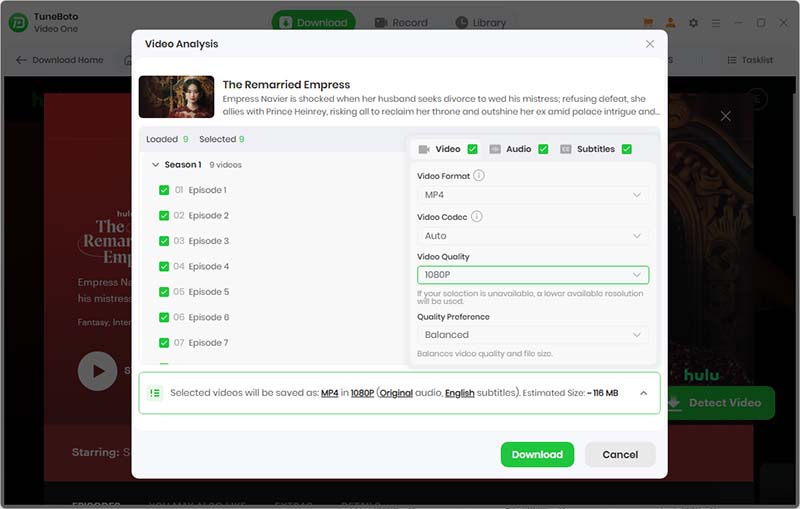
Start Downloading
Click the Download button and wait for the process to complete.

Enjoy downloading your favorite Hulu content with TuneBoto Video One!
Method Comparison: Which Hulu Offline Option Is Best?
The main difference is whether you want temporary offline playback inside Hulu or a standard video file for local playback.
| Feature | Official Hulu App | Free Extensions / Screen Recorders | TuneBoto Video One* |
|---|---|---|---|
| Output quality | Hulu-supported quality | Variable; often reduced | Depends on supported source |
| PC support | No general offline-download support | Varies; often blocked | Windows for supported websites |
| Mac support | No general offline-download support | Varies; often blocked | macOS for supported websites |
| Mobile support | Supported devices only | Varies by tool | Desktop-focused |
| Expiration | Subject to Hulu's expiration rules | No standard rule; recording creates a file | Local files do not use Hulu's in-app timer |
| Format | App-managed, protected download | Varies; recording may export MP4 | MP4 / MKV where supported |
| Success rate | High for eligible titles | Unpredictable with protected streams | Depends on website support and restrictions |
*TuneBoto's comparison applies to websites and videos it currently supports. It is not a claim that every Hulu title can be downloaded.
How to Choose
- Choose the official Hulu app for the simplest way to watch eligible titles offline on a supported phone or tablet.
- Use a free recorder only for content you are allowed to record and where recording is technically supported. It is not a reliable way to capture protected Hulu playback.
- Consider TuneBoto Video One for a desktop workflow managing videos from supported websites in standard formats. Confirm compatibility and permissions first.
For most Hulu subscribers, the official app is the safest starting point for offline viewing. A desktop downloader is not automatically compatible with Hulu simply because it supports other video websites.
Hulu Download Troubleshooting
Possible reasons include:
- The title is not eligible because of content licensing.
- Your plan does not include downloads; check whether it is an eligible No Ads plan.
- Your device or app version is unsupported.
- You are outside a supported region.
- The app needs to be updated.
If only certain titles are affected, licensing is a likely explanation. If no titles can be downloaded, check your plan, device, app version, and available storage.
An expired download may no longer play offline. Hulu downloads commonly have two timing rules: a title may expire after 30 days if playback has not started, and after you start watching it may expire after 48 hours. Reconnect to the internet and check whether Hulu lets you renew or download it again. A title that has left Hulu's catalog may no longer be available.
- Connect to a stable Wi-Fi network and retry.
- Check available device storage.
- Update Hulu to the latest version.
- Close the app completely, reopen it, and try again.
- Restart your device.
- Try another eligible movie or episode to check whether the issue is title-specific.
- If downloads remain stuck, sign out and back in, then check Downloads.
If these steps do not work, consult Hulu Support. Before deleting the app or clearing its data, check whether doing so will remove existing downloads.
Hulu has commonly used a limit of 25 downloads across up to 5 supported devices. Remove watched or unwanted titles from the Downloads sections on your devices, check other devices signed in to your account, then retry. Deleting a regular video from your phone's photo gallery will not necessarily remove a Hulu app download.
Hulu does not generally provide its in-app offline download feature for Mac computers or Windows PCs. Streaming Hulu in a supported browser is different from saving a title for offline playback. For offline access, check Hulu's current supported-device list and use its official app on an eligible mobile device.
Hulu's official downloads are managed inside its app, not provided as ordinary MP4 files to move to a USB drive or open in any media player. An MP4 converter or downloader cannot automatically convert every Hulu stream into a playable MP4. Only save or convert videos when you have the necessary authorization.
Yes. If you downloaded an eligible title through the official Hulu app, you can watch it offline without Wi-Fi, subject to expiration rules and other restrictions. Before a trip, download while connected to the internet and check the Downloads section to confirm the title is ready to play.
Final Verdict: What's the Best Way to Watch Hulu Offline?
- For phones and tablets: Hulu's official app is the most straightforward option for eligible downloads.
- For PC and Mac users: Hulu's official offline-download feature has significant limitations. Streaming in a browser is not the same as downloading a video.
- For other supported online videos: TuneBoto Video One offers a desktop workflow with MP4 and MKV options where supported, but it should not be treated as a guaranteed Hulu downloader.
To watch Hulu without Wi-Fi, start with the official app and check your subscription and title eligibility. To manage local video files from other supported websites, review TuneBoto Video One and confirm current compatibility before you begin.
Hulu's download limits and terms can change. Verify current details with Hulu before relying on specific device, expiration, or download-count limits.
